

A covered call commits you to sell 100 shares you already own at a fixed price. You take cash upfront for making that commitment. That payment is the premium.
This guide does not cover how to sell covered call on Robinhood by choosing the right stock or strike price. For that part, read our guide to selling covered calls for income. Here you will get a filled sell-to-open order, with your shares held as collateral. Holding shares as collateral means they are set aside to back the trade.
Screen names in this guide follow Robinhood’s own support documentation as of September 3, 2026. Robinhood changes its app, so confirm the current wording on its support pages before you rely on it.
Most blocked orders come down to one issue. Approval, share count, or fee awareness was not in place before you hit submit. We will handle that first.
Before you start: Level 2 approval, 100 shares, and fee reality check
Missing any item here is the most common reason Robinhood rejects a covered call.
Options approval. Robinhood divides options trading into levels. A covered call gives someone else the right to buy your stock at a set price. Robinhood documents covered calls under Level 2, alongside long calls and long puts. Check your current level in your Robinhood account settings, and if you are below it, apply and wait before doing anything else. Robinhood’s Basic options strategies (Level 2) support page lists what the level allows.
The right account. Your shares and options order must sit in the same account. Shares held in an individual account cannot cover a call sold out of an IRA.
100 shares per contract. One options contract always covers exactly 100 shares. Cash cannot replace the shares. If you own 150 shares, you can sell one contract, not one and a half. Robinhood’s covered call collateral page explains how it locks those shares for as long as the trade is open.
Shares get frozen. Once your call is open, Robinhood stops you from selling the shares tied to it. They stay locked until the position is closed or expires.
Fees are real, and they are not pennies. Robinhood advertises commission-free trading, but options carry a per-contract charge. On a standard equity option, Robinhood charges $0.50 per contract, or $0.35 with a Robinhood Gold subscription, plus about $0.04 in combined regulatory fees. That is roughly $0.54 per contract, or $0.39 on Gold. Index options are priced separately. Check the current per-contract fee schedule before you trade.
Use a limit order. A limit order sets the lowest premium you will accept. That premium is the cash you receive for selling the call. Market orders can fill badly when the bid-ask spread is wide. Robinhood may block market orders on some options altogether. See Robinhood’s order type documentation for details.
Have ready: the ticker, your share count, the price you are willing to sell at, and the earliest date you can accept the shares being called away.
Have all of that in place? Move to Step 1.
Step 1: Verify Robinhood options access and that covered calls are allowed
Do not skip this step. If your account does not have the correct options level, Robinhood will block the order before it reaches the market.
Robinhood groups accounts into options trading levels. Each level is a tier that controls which strategies you can place. Covered calls require Level 2. That tier also includes cash-secured puts and long calls or puts. A long call or put simply means you are buying an option rather than selling one.
Check your approved level in your Robinhood account settings. App menus move between versions, so look for the options section of your account rather than following a memorised route. Robinhood’s Basic options strategies (Level 2) page explains what the level covers, so compare your account against that page instead of guessing.
A covered call works only one way on Robinhood. The shares you own must fully cover the contracts you sell. That coverage is the reason for the name. There is no naked covered call, because the shares themselves are collateral. Collateral is the asset you set aside to guarantee you can complete the trade.
This setup differs from spreads and other multi-leg strategies. Those usually require a higher options level and often need margin, which is money borrowed from the broker. Covered calls never need margin. You are only agreeing to sell stock you already own.
If your account is below Level 2, you cannot place this trade yet. Apply for a higher options level in your account settings and wait for Robinhood to review the request. The review can take anywhere from a few minutes to a couple of days. Once approved, return here and continue. There is nothing else to fix while you wait. Approval is Robinhood’s decision, not something you can speed up.
If Robinhood shows you have the level that includes covered calls, go to Step 2.
Step 2: Confirm your collateral: 100 shares per contract and what gets locked
Before you sell anything, confirm your share count. Open Robinhood and check your position in the stock. Make sure this is the same account with the options approval from Step 1. That approval allows options trades. Shares in a different account do not count, even if you also own that account.
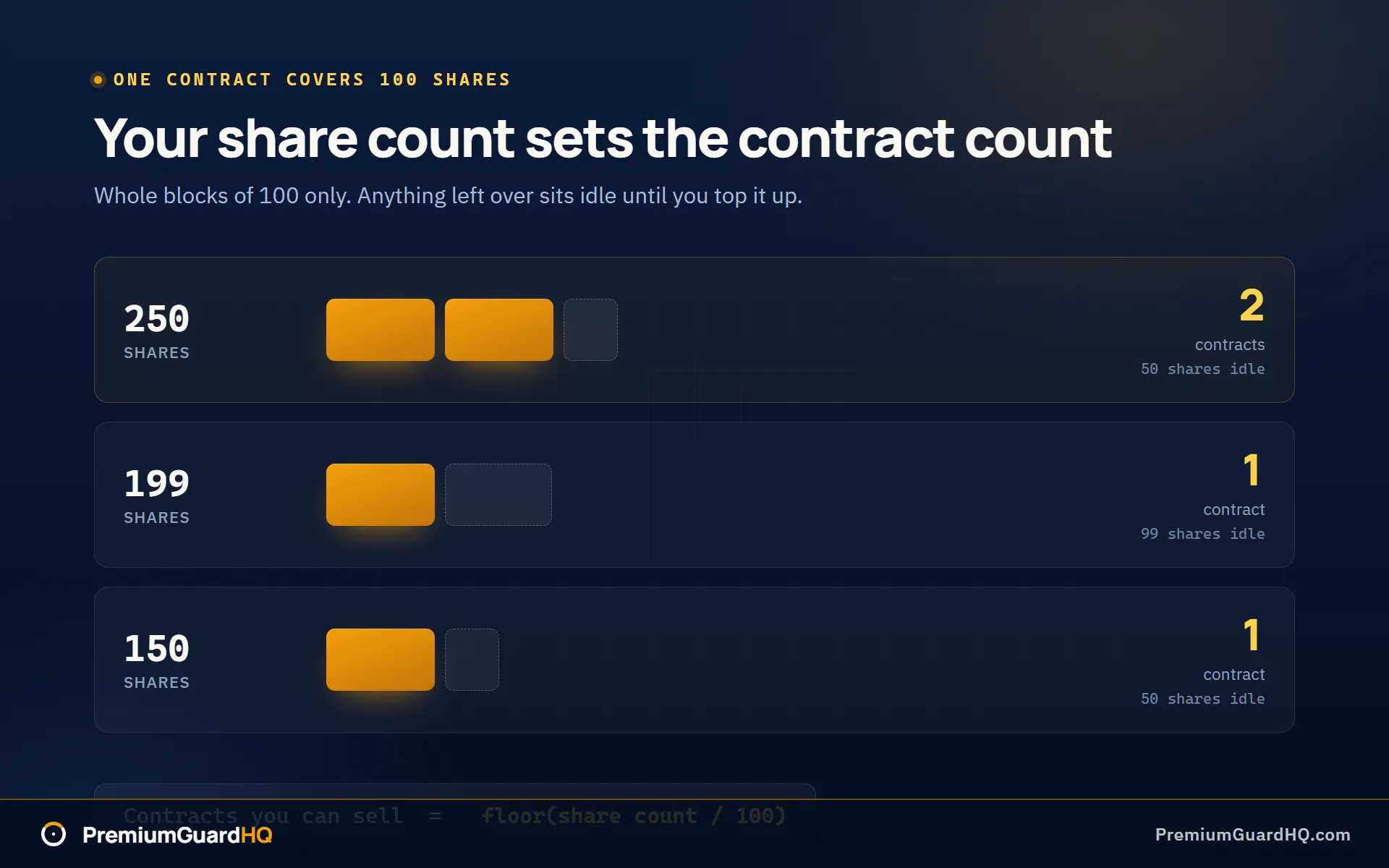
The math that controls your contract limit is simple. A contract is one options agreement. One covered call contract always covers 100 shares. To find your maximum contract count, divide your share count by 100 and drop everything after the decimal point.
Contracts you can sell = floor(share count / 100)So 250 shares allow 2 contracts, not 2.5. With 199 shares, you can still cover only 1 contract. The other 99 shares sit unused until you buy 1 more share to complete a second block of 100.
Once your covered call is open, Robinhood locks the shares behind it. You cannot sell those shares while the call is active. This is not a glitch. Those shares are what Robinhood hands over if you are assigned. Assignment means the buyer used the right to buy your shares at the strike price. Robinhood needs those exact shares ready at that moment. Check Robinhood’s collateral rules for the exact wording.
This is also your final checkpoint before you commit. Selling a covered call means you agree in advance to sell your shares at the strike price if the stock reaches it. Ask yourself plainly whether you are willing to sell at that price. If yes, continue. If seeing shares called away at that number would bother you, choose a different strike now, before the order fills.
By now you know your maximum contract count. You should also be fully willing to sell at your chosen strike if assigned.
Step 3: Build the order: pick expiration, strike, and a limit credit
Open the Robinhood app, search for the stock you own, and select it. Robinhood’s own instructions are to choose Trade, then Trade options, on the detail page. From there, select sell and call. That tells Robinhood you want to sell to open, which means you receive cash immediately instead of paying it.
Pick an expiration. This is the date your contract ends. A short expiration, like one or two weeks out, moves fast as the date approaches, so you need to watch it more often. A longer expiration stays calmer day to day but locks up your shares for longer. It also pays more cash upfront. Many traders choose something between 20 and 45 days out. That is only a common habit, not a rule you must follow.
Pick a strike. The strike is the price you agree to sell at if assigned. Assignment means the buyer uses the right to buy your shares at that price. Only choose a strike you would be happy to sell at. Robinhood displays a figure called delta next to each strike price. Delta is a rough estimate of the probability your shares get called away. A delta between 0.10 and 0.25 is a starting range some traders use for a strike that probably will not be hit. Before you commit, model the premium and the assignment price together. This is only a common habit, not trade advice.
Set the contract count. Enter the number from Step 2. Each contract still covers 100 of your shares.
Set the order type to limit, not market. A market order fills immediately at whatever price is available, even a bad one. A limit order lets you set the lowest premium you will accept. Premium is the cash you collect for selling the call. A limit order protects you from a bad fill when few people are trading that contract. Enter the lowest credit you will accept.
Budget for the contract fee. Robinhood charges no base commission, but a standard equity options contract still costs roughly $0.54: a $0.50 Robinhood contract fee plus about $0.04 in regulatory fees. Robinhood Gold cuts the contract fee to $0.35. The charge appears on the confirmation screen before you submit. Check Robinhood’s trading fees page for the current rate.
You now have an order draft that is a covered call. It has sell to open, one call per 100 shares, and your expiration, strike, and limit credit filled in.
Step 4: Review, submit, and manage the open call through expiration
Before you tap Submit, check Robinhood’s order screen one last time.
- Check the pairing. You should see a short call paired with your long shares. A short call means you sold someone the right to buy your shares. This pairing is what makes the position a covered call rather than an uncovered position.
- Check the contract count. It should match the share blocks from Step 2. One contract needs 100 shares behind it.
- Check the obligation. If the stock closes above your strike price at expiration, you must sell 100 shares per contract at that strike. This happens no matter how high the stock climbs. The strike price is the set price you agreed to sell at.
If all checks pass, tap Review, then Submit.
Once the order fills, a short call position appears in your account. The premium you collected appears as cash. Premium is the money you received for selling the call. It also adds to your buying power immediately, which is the amount you have available to trade with.
Know your three ways out.
From here, three outcomes are possible before the trade ends.
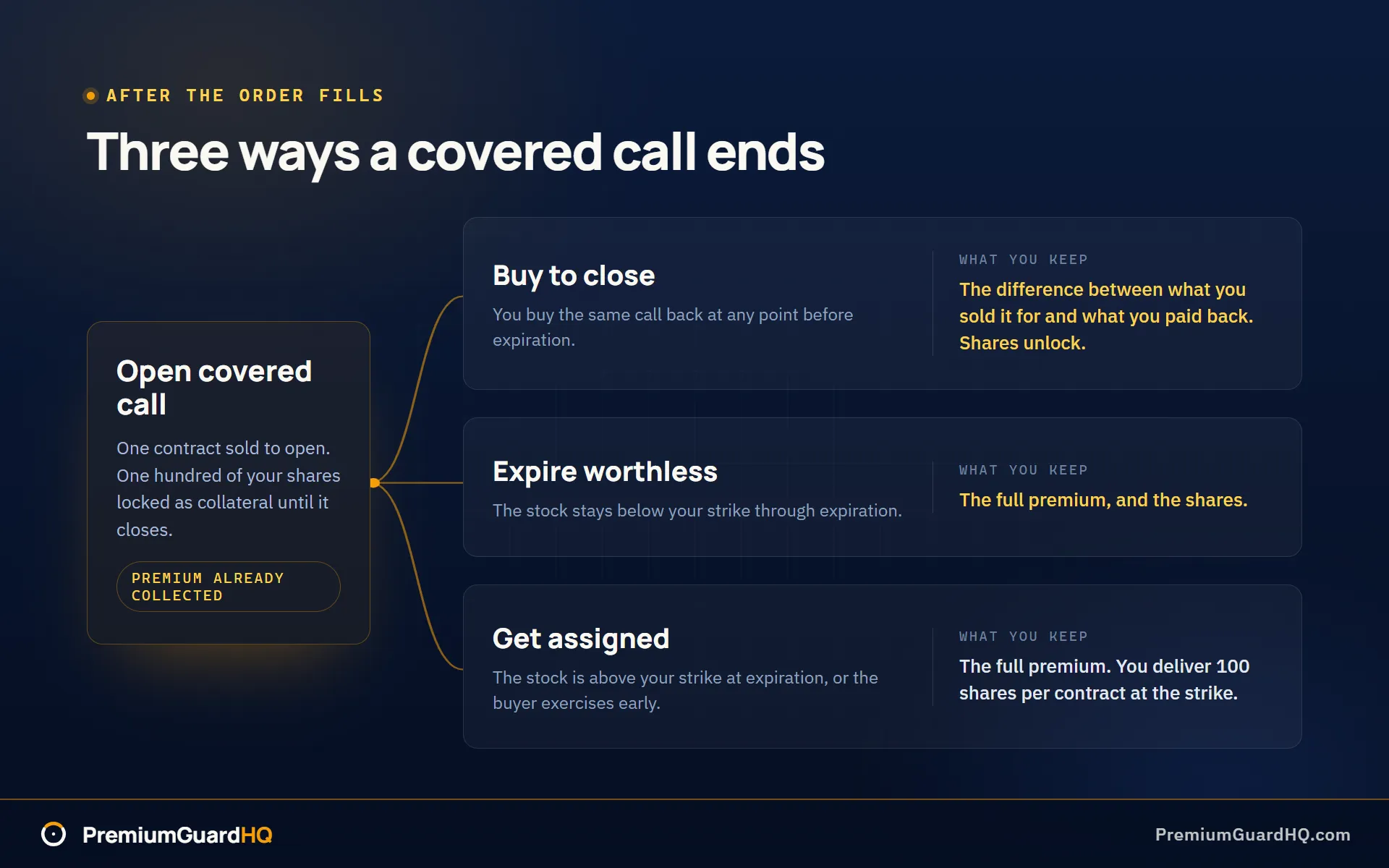
- Buy to close. You can buy back the same call anytime before expiration. That cancels your obligation early. You keep the difference between what you sold it for and what you paid to buy it back.
- Expire worthless. If the stock stays below your strike price through expiration, the call disappears afterward. You keep the full premium and your shares.
- Get assigned. Assignment means you must deliver your shares. If the stock is above your strike at expiration you will be assigned, and assignment can arrive before expiration day if the buyer exercises early. Either way you give up 100 shares per contract at the strike price.
A few Robinhood-specific details.
Robinhood lets you send a “Do Not Exercise” request through Support. Use it if you hold a long option near expiration and want to waive exercise. Robinhood handles this on a best-effort basis, not as a guarantee.
Robinhood may also close positions before the market closes on expiration day. This is handled on a best-effort basis to manage expiration risk. Do not rely on either action as your main plan. The strike you choose is still the decision that matters most.
Traditional brokers offer the same trade with more tools around it, and Schwab runs it through a more formal order ticket. The underlying obligation does not change. Sell a call, and you owe the shares if assigned.
At this point you have an open covered call and a clear plan for how it ends: buy to close, expire worthless, or assignment.
What success looks like after you sell a covered call on Robinhood
Right after the order fills, check four things.
First, look for a short call position tied to your stock. A short call means you sold someone the right to buy your shares at a set price. Seeing it listed confirms the covered call is live.
Second, check the contract count. It should match what you set earlier: one contract for every 100 shares you intended to cover.
Third, Robinhood should now block you from selling those covered shares separately. That block is a good sign. It means your shares are locked as collateral for the call. Brokers present that lock differently, and on the Fidelity version of this trade the shares stay listed in Positions with a separate short call line beside them.
Fourth, check your cash balance or buying power. Your premium should appear there. Premium is the cash you collected for selling the call.
Over the following days, compare the strike price with the stock’s price. The strike price is the price you agreed to sell at. If the stock stays below your strike, the call is on track to expire worthless. That is the outcome you want because you keep the shares and the premium. If the stock climbs above your strike, the call is finishing in the money and your shares may be called away. If you want out early, place a buy-to-close order to end the trade before expiration.
If you run covered calls or cash-secured puts across more than one broker, tracking each cycle by hand gets messy quickly. PremiumGuardHQ uses a read-only Robinhood connection through SnapTrade. Once connected, it calculates every closed cycle, your real cost basis, and your true withdrawable income automatically.
Frequently asked questions
Why can’t I sell a covered call on Robinhood even though I own 100 shares?
Start with your options approval level. Robinhood places accounts into tiers, and it documents covered calls under Level 2. Check your current level in your Robinhood account settings. Next, confirm your shares sit in the same account as your options approval and in a full block of 100. Also rule out a pending order, unsettled activity, or a house-risk restriction on the account. Robinhood’s options collateral and options investing support pages list the exact causes.
Does Robinhood charge fees to sell covered calls?
Robinhood charges no base commission, but selling a covered call is not free. A standard equity options contract carries a $0.50 Robinhood contract fee, reduced to $0.35 with Robinhood Gold, plus about $0.04 in combined regulatory fees. That is roughly $0.54 per contract, or $0.39 on Gold, and index options are priced separately. Robinhood publishes the current schedule on its trading fees page, and the numbers change, so check before you place the order.
Can I get assigned early on a covered call in Robinhood?
Yes. Assignment means the option buyer used the right to buy your shares at the strike price, and it can happen before expiration, not only on that date. If it happens, you must deliver 100 shares per contract at the strike, no exceptions. Robinhood publishes guidance on assignment, allows a Do Not Exercise request through Support if you hold a long option, and handles expiration-day risk on a best-effort basis. None of that replaces choosing a strike you are actually willing to sell at.
Covered call vs cash-secured put on Robinhood: what’s the operational difference?
A covered call uses shares you already own as collateral, 100 shares per contract. A cash-secured put uses cash instead. Robinhood sets aside enough money to buy 100 shares at the strike if you are assigned. Both are bullish-to-neutral trades where you collect premium upfront in exchange for taking on an obligation. Which one you use depends on whether you already own the stock. The mechanics work the same way at Schwab and other brokers, although the tools and disclosures differ.