
A broker will display a cost basis, but that number shifts in the background after an assignment. Roll a covered call twice and the spreadsheet fails. Those formulas were never built to hold up through an assignment chain.
Wheel tracking works differently from ordinary trade journaling. The strategy moves through a cycle: sell puts, sometimes take ownership of the shares, then sell calls against them. A wheel strategy tracker has to follow the entire loop and keep the accounting accurate, rather than simply collect a list of trades.
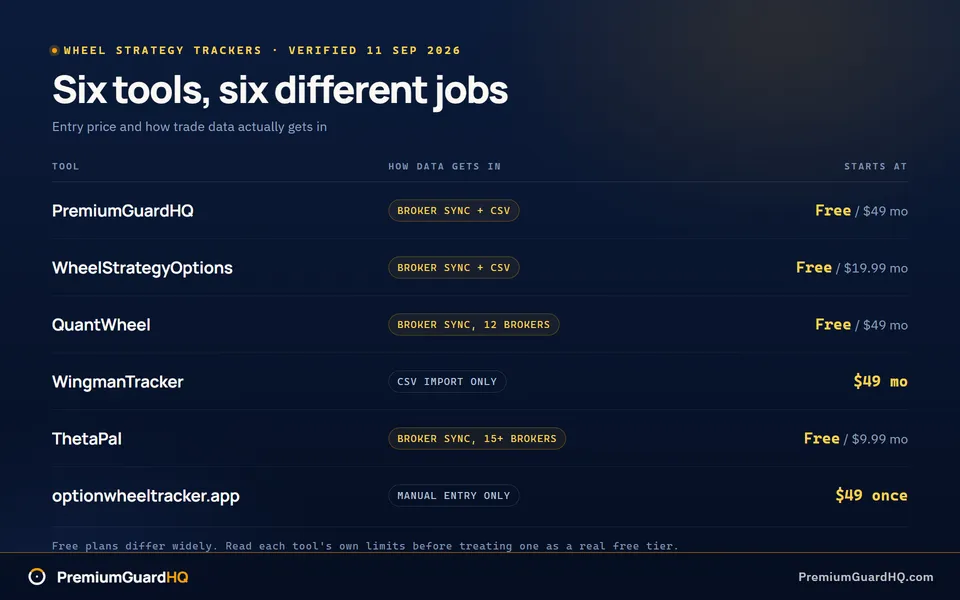
Prices and features for all six tools were checked on September 11, 2026. Treat this as a roundup, not a head-to-head comparison. Each option suits a different trader, so choose the one that fits your actual need instead of the one marked “best.”
| Tool | Best for | Starting price | Getting data in | Export |
|---|---|---|---|---|
| PremiumGuardHQ | Cycle accounting and withdrawal math | Free, Pro $49 a month | Broker sync (Schwab, IBKR, Robinhood, Fidelity, tastytrade) plus CSV | No |
| WheelStrategyOptions | Screening first, at the lowest price | Free, Pro $19.99 a month | Single broker sync plus CSV | Yes |
| QuantWheel | One workflow for screening, tracking and rolls | Free sandbox, GEX $49 a month | Broker sync, 12 brokers | Not verified |
| WingmanTracker | Broad journaling across strategies | $49 a month, no free tier | CSV import only | Not verified |
| ThetaPal | Cheap position monitoring and roll alerts | Free, Pro $9.99 a month | Broker sync, 15+ brokers | Yes, from Pro |
| optionwheeltracker.app | A one-time price and manual control | $49 once | Manual entry only | Not verified |
Cycle accuracy and broker sync are the two places where these tools pull apart.
1. PremiumGuardHQ: Best for automatic cycle accounting and withdrawal discipline
After eight months of selling puts and calls, how much of that cash is actually yours to spend? You need a figure that matches your trades, not the broker’s messy version. PremiumGuardHQ was built to answer that question. It is a tracker made only for wheel traders. Its job is to fix the cycle math brokers get wrong so the numbers line up with what actually occurred.
Pricing, verified September 11, 2026: The Free plan costs $0. Pro runs $49 a month or $470 a year. A 14-day Pro trial is free and asks for no credit card.
How it pulls in your data: PremiumGuardHQ never places trades. It only reads the account. Schwab links through OAuth, a secure login handoff rather than a shared password. Interactive Brokers links through a Flex token, which is a read-only key issued by IBKR. Robinhood, Fidelity, and tastytrade link through SnapTrade. A CSV file, which is a plain spreadsheet export from a broker, can also be uploaded.
The tool earns its price in three places. First, it handles cost basis through assignment. When a put becomes stock, the tracker adjusts the real purchase price instead of making you do the arithmetic by hand. Second, it connects the whole position. Sell a put, take assignment, sell three calls, and then get called away. That is one story, not five separate trades. Third, the Safe Withdrawal Engine reports the exact dollar amount you can take out of locked-in profits without reducing the equity you trade with.
The limitations are clear. PremiumGuardHQ has no screener, so it will not suggest a stock or a strike price. It has no roll finder, which means it will not tell you when or how to roll a position. There is also no data export button yet, so your trade history for tax time comes from your broker rather than from PremiumGuardHQ.
The tool fits traders who treat premium as income and want an exact read on what they earned and what they can safely withdraw. If the main need is a cheap way to screen for new trades, WheelStrategyOptions is the better choice.
Start with the free plan. Traders carrying real history across several accounts can use the 14-day Pro trial to see the withdrawal math for themselves.
2. WheelStrategyOptions: Best for cash-secured put and covered call screening
Traders who spend more time hunting for the next trade than logging the last one will find the balance reversed here. WheelStrategyOptions is wheel strategy software built for screening first and tracking second. It scans the market for cash-secured puts and covered calls that match your rules, then follows the trade after entry.
Pricing, verified September 11, 2026: Free Forever includes a basic screener at no cost. Pro runs $19.99 a month, $198 a year, or $299 as a one-time lifetime payment. Ultra costs $39 a month, and Maxx costs $99 a month.
On the data: WheelStrategyOptions pays for its market data through a licensing deal with Intrinio, a financial data provider that sells price feeds to other software companies. That detail matters. Some small trading tools scrape numbers from unknown sources, and those figures can be stale or wrong. Licensed data means the quotes used for screening come from a paid, accountable source.
What you get: A cash-secured put screener and a covered call screener narrow the market to strikes and premiums that fit your rules, so you do not scroll ticker by ticker. Automated Wheel Cycle Detection treats the put, the assignment, and the calls that follow as one connected cycle rather than separate line items. Pro and higher plans also include 15-minute delayed options chains, keeping prices close to live.
For moving data in and out, WheelStrategyOptions supports CSV import and export. A CSV is a plain spreadsheet file. You can pull one from your broker and upload it, or download one from the tool for your own records.
Two items remain unverified. The vendor does not state whether cost basis adjusts automatically through assignment, so treat that as not verified. Whether a native mobile app exists is also not confirmed.
Best for: traders who want screening before tracking, at the lowest price among the full-featured tools on this list.
Start on Free Forever to test the screener with live market data. Move to Pro when cycle detection and delayed chains matter more than digging through raw options tables by hand.
3. QuantWheel: Best for an all-in-one wheel workflow with screening and rolls
A tracker that only records trades falls short when you also need to screen new positions and compare roll candidates. QuantWheel addresses that gap. It is a wheel-focused platform that combines trade tracking, stock screening, and a roll assistant. A roll means closing a current option and opening a new one, usually later in time or at another strike. QuantWheel removes the need for three separate apps to run the wheel.
Pricing, verified September 11, 2026: The free plan provides a sandbox for testing the platform. A sandbox is a safe practice area with no real money at risk. GEX runs $49 a month or $228 a year. GEX+Wheel runs $79 a month or $420 a year. Quant runs $119 a month or $708 a year.
How it connects to your broker: QuantWheel currently links to 12 brokers, with 2 more on the way. Every connection runs through SnapTrade, a read-only service. Read-only access lets QuantWheel see trades and positions, but it can never place an order or move money.
What you actually get: QuantWheel adjusts cost basis after a put assignment, so the purchase price reflects premium already collected. The Roll Assistant is the main feature. It lets you compare roll choices side by side, so the math does not have to be done by hand. Several screeners are built in as well. Use them to search for new cash-secured put and covered call candidates without leaving the platform.
A few details are not confirmed anywhere on QuantWheel’s own pages. Spreadsheet export is not verified. A mobile app is not verified. Support for tax forms at filing time is also not verified. Beyond the plain description on its site, we also cannot say exactly how the cost-basis engine works.
Want a deeper comparison? We covered PremiumGuardHQ against QuantWheel feature by feature in a separate head-to-head guide.
Best for: traders who want one workflow for screening, tracking, and rolls, rather than only the accounting piece.
If clean wheel tracking is all you need, the free sandbox or GEX+Wheel at $79 a month covers it. Traders who also follow broader options flow and want quant and GEX tools should step up to the $119 Quant tier.
4. WingmanTracker: Best for broad journaling, not wheel-specific
Some traders would rather avoid a wheel-specific tool entirely. They want a general trading journal that also works for wheel trades. WingmanTracker is that tool. Everything below is what is confirmed on its own public pages as of September 11, 2026.
What it is: WingmanTracker is a general trading journal, not a wheel-first product. It handles wheel trades well enough, but nothing in it is built around the wheel’s sequence of puts, assignment, and calls.
Pricing, verified September 11, 2026: One tier at $49 per month. A 30-day risk-free trial exists, but there is no free tier. The trial is the way to test it.
How it gets your data in: CSV import only. You export trade history from a broker as a spreadsheet file and then upload it. No live broker sync appears on its public pages.
What it does well: It includes a cost-basis mode. That helps track what you actually paid for a position after premium adjustments, even outside a wheel-specific structure.
What we couldn’t confirm: A few things do not appear on WingmanTracker’s public pages. No wheel screener was found, so there is no built-in way to scan for wheel candidates. No roll finder was found, so identifying roll opportunities falls to you. No export feature was found either. Absence from public pages means we could not verify it, not that it definitely does not exist.
Best for: traders who want journaling and performance review across several strategies, rather than only the wheel, and who are comfortable structuring wheel cycles by hand.
Not ideal if: you need wheel cycle accounting that survives assignment automatically. Assignment happens when a broker forces the trade because the stock crossed the strike price. A wheel-native tool tracks that transition for you. WingmanTracker does not appear to do so.
Use the 30-day trial to see whether CSV-only import fits the way you actually work before committing.
5. ThetaPal: Best for lightweight position monitoring and roll alerts
ThetaPal keeps an eye on open positions and flags when a roll might make sense. Rolling means closing the current option and opening a new one, usually later in time or at a different strike. ThetaPal is a monitoring and roll-suggestion tool, not a full wheel tracker. It watches positions and sends nudges. That is the whole job.
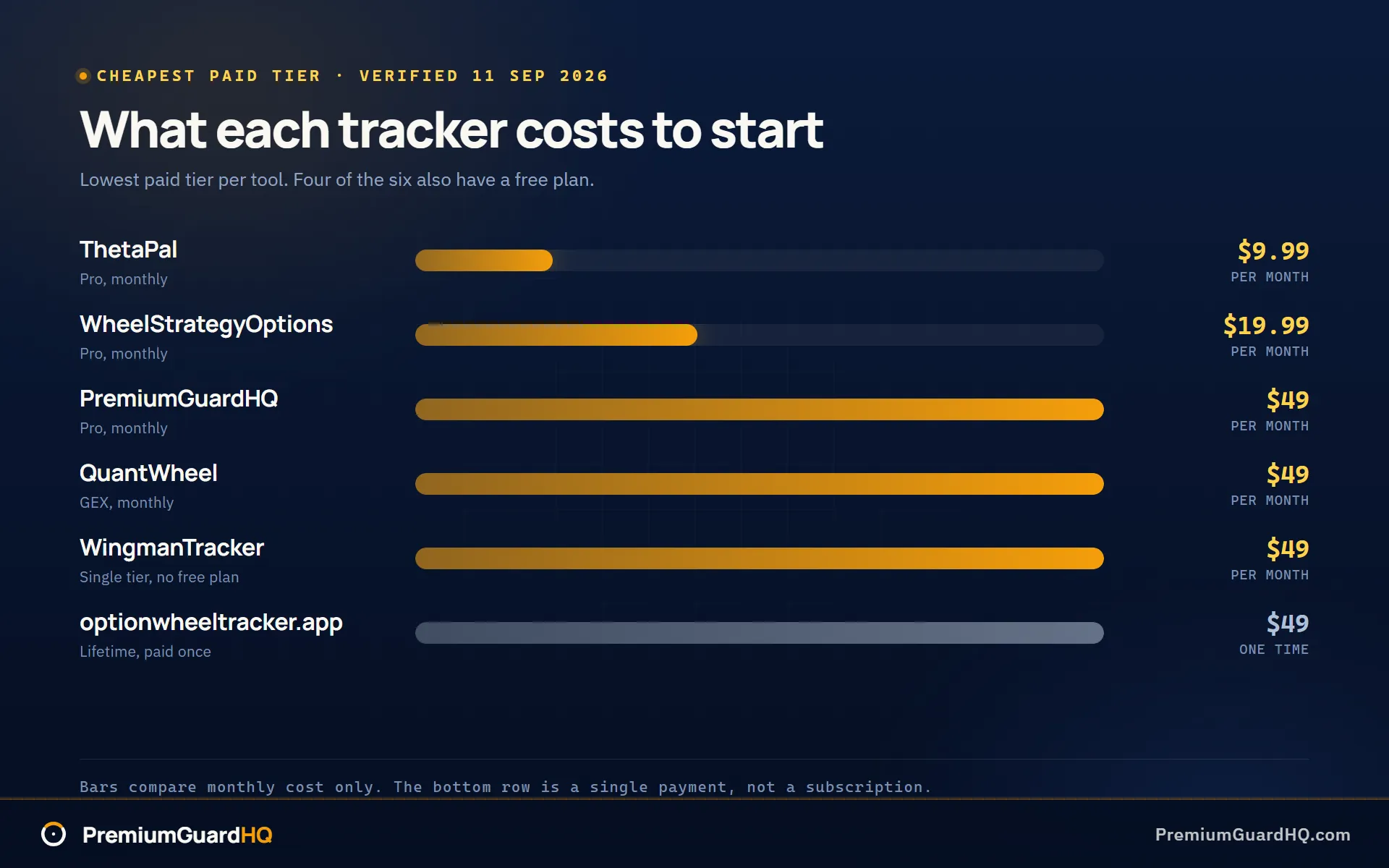
Pricing, verified September 11, 2026: Free costs $0. Pro runs $9.99 a month. Premium runs $14.99 a month. That is the cheapest paid tier on this list by a wide margin.
How it connects to your broker: ThetaPal uses SnapTrade to sync with your broker. The connection is read-only, so it can see the account but never place a trade. SnapTrade links ThetaPal to more than 15 brokers.
What you get: A heat map color-codes positions so trouble is easy to spot at a glance. AI roll suggestions flag positions where rolling might make sense based on time left and how close the price sits to the strike. Pro and higher unlock CSV export, so data can be pulled into a spreadsheet.
ThetaPal’s site does not claim to handle cost basis through assignment anywhere. Tracking the real purchase price after a put turns into stock is a specific, harder job, and ThetaPal makes no such claim. Think of it as a second set of eyes on positions already tracked elsewhere, not as the system of record for cycle profit and loss.
Best for: traders who want a cheap, simple way to watch positions and receive roll alerts, especially when full cycle accounting is not needed.
Not ideal if: you need assignment-aware cost basis and a real profit number for every completed cycle. That requires a tool built around cycle accounting, not just monitoring.
Start on Free to test the heat map and roll suggestions. Move to Pro when CSV export becomes important.
6. optionwheeltracker.app: Best for manual control and a one-time lifetime price
A quick note first. This is optionwheeltracker.app. It is not optionwheeltracker.com and not optionwheeltracker.ai. Those are different sites with different features, so confirm you are on the right one.
optionwheeltracker.app is a manual-entry wheel tracker. Every trade is typed in by hand. A wheel trade, or “campaign,” is the full story of one wheel position: the put sold, the assignment if one occurred, and every call sold afterward. The tool builds a timeline of that campaign and updates the adjusted cost basis automatically as each trade is logged. Adjusted cost basis simply means the real purchase price after premium is included.
Pricing, verified September 11, 2026: $49, paid once. No monthly fee and no yearly renewal. You own it for life.
The tradeoff is simple. optionwheeltracker.app has no broker sync, so it does not connect to a brokerage account or read positions automatically. Manual entry is the intended design rather than an oversight. Every trade is entered by hand, so no login is shared and no data is pulled by a third party.
A few things are absent from its public pages. There is no screener, so no built-in way exists to scan for new trade candidates. There is no roll finder. There is no export feature, so we could not confirm a way to move data into a spreadsheet.
Best for: traders who refuse to connect a brokerage account to any tool, who prefer a simple ledger over a feature-heavy dashboard, and who want to pay once instead of starting another subscription.
Not ideal if: you trade across multiple brokers and want automatic sync, or you need to export records for taxes or backup.
Think of it as a structured replacement for a spreadsheet. If you already like keeping your own ledger by hand but want the cost basis math handled for you, this tool does that job at a fixed one-time price.
How to pick the right wheel tracker for you
Before choosing a tool, identify the actual problem first. These six tools solve different problems. Searching for one “best” tool will likely point you to the wrong one.
Ask which of these sounds like you:
-
I need a true cost basis after a put turns into stock. A put is a contract that can force you to buy shares at a set price. I want the full cycle linked together from the first put through every later trade.
-
I need help finding new wheel trades, rather than only logging old ones.
-
I need help deciding when to roll a position I already hold. Rolling means closing the current option and opening a new one, usually to buy more time.
-
I just want a simple, honest ledger. A ledger is a record of your trades, and I will handle the rest by hand.
Each answer points to a different tool. The matching process works like this.
Criterion 1: Do you need assignment-aware cost basis?
Assignment occurs when a broker forces a trade because the stock crossed the strike price. The strike price is the set price written into the option contract. Assignment is where spreadsheets and simple trackers usually fail. The Options Industry Council explains what happens when an option is exercised, and we cover what assignment does to your cost basis in its own guide.
Check the vendor’s page for two items. First, look for a clear claim about handling cost basis through assignment. Second, see whether the tool links a full cycle as one story. A full cycle means the put, the assignment, and every call after it are connected rather than scattered as separate trades.
PremiumGuardHQ and QuantWheel both state this directly. ThetaPal does not. It watches positions and suggests rolls, but never claims to fix cost basis after assignment.
Criterion 2: Do you need screening, or just tracking?
Screening means searching the market for new trade setups. Tracking means recording trades that are already open or closed.
If you spend real time looking for new puts and calls to sell, a built-in screener matters. WheelStrategyOptions wins on screening depth and price. QuantWheel also screens, and adds a roll assistant and quant tools on top.
If you already like a screener elsewhere, skip this criterion and prioritize accounting depth instead. Paying for a second screener you will not use is wasted money.
Criterion 3: How much manual work will you actually do?
Broker sync means trades appear on their own, pulled directly from a brokerage account. CSV import means exporting a spreadsheet from a broker and uploading it by hand. Manual entry means typing every trade yourself, one at a time.
Be honest about which method you will actually maintain. A broker sync you forget to check is no better than a spreadsheet you forget to update. When broker sync exists, choose read-only connections where possible. Read-only means the tool can see the account but can never place a trade or move money.
Criterion 4: Can you actually get your data back out?
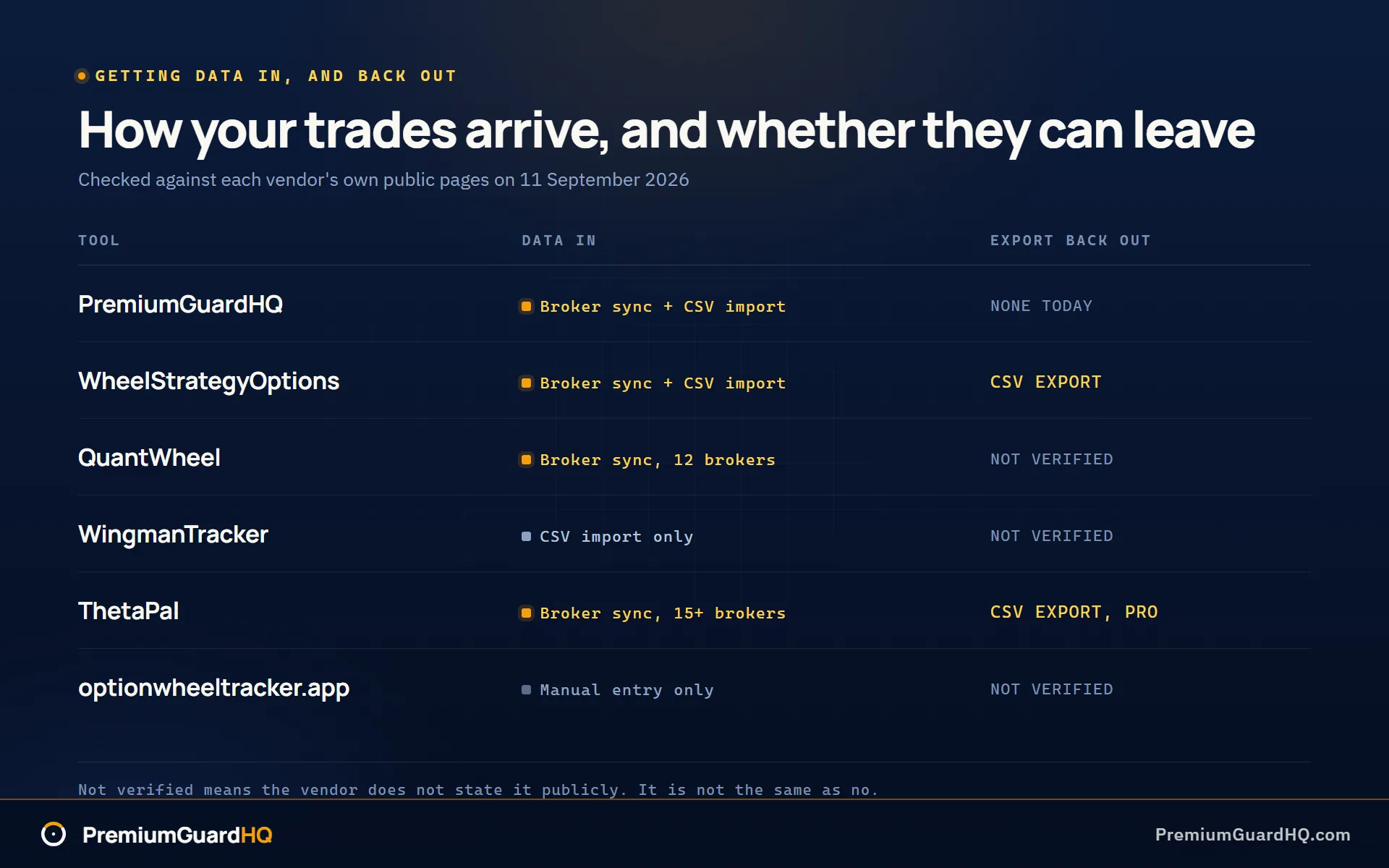
Ask the vendor’s page one plain question. Can I export my data, and in what format? This matters at tax time, because the IRS sets out how your basis in an asset is defined and you are the one who has to support the number. If the answer is not stated anywhere public, treat it as not verified. Do not assume yes just because nothing says no.
PremiumGuardHQ has no export feature today. WheelStrategyOptions and WingmanTracker both support export on the Pro tier.
Criterion 5: What are your budget and trial constraints?
For the lowest ongoing cost, ThetaPal starts at $9.99 a month. For a one-time payment with no broker sync, optionwheeltracker.app costs $49 once, for life, with no monthly fee afterward.
If you only want to sanity-check the arithmetic of one cycle before paying for anything, a free wheel strategy calculator covers that much without an account.
For trials, PremiumGuardHQ offers a 14-day Pro trial and does not ask for a credit card. WingmanTracker offers a 30-day risk-free trial.
Quick-start recommendations
No tool wins in every situation. Start with the one that matches your use case:
-
If you run the wheel like a business and pay yourself from profits: start with PremiumGuardHQ.
-
If you want screening first at the lowest price: start with WheelStrategyOptions.
-
If you want cheap roll suggestions and position monitoring, nothing deeper: start with ThetaPal.
Frequently asked questions
What is a wheel strategy tracker, and why does assignment break spreadsheets?
A wheel strategy tracker follows the full cycle: the put sold, the shares assigned, and every covered call sold afterward. Assignment happens when a broker forces the trade because the stock crossed the strike price. Regular spreadsheets log each trade on a separate line, so when a put turns into stock, the real cost basis is not updated by hand. That leaves the break-even number wrong until you catch it yourself.
Do these tools calculate cost basis through assignment automatically?
Only a few make this clear. PremiumGuardHQ and QuantWheel both directly claim assignment-aware cost basis, meaning they adjust the real purchase price after a put becomes stock. optionwheeltracker.app also does this, though trades must be entered by hand first. ThetaPal makes no such claim anywhere on its site. It watches positions and suggests rolls, but it is not built to fix cost basis after assignment.
Can I export my wheel trades for taxes?
The answer varies by tool. WheelStrategyOptions supports CSV export, a plain spreadsheet file you can hand to an accountant. ThetaPal offers CSV export on Pro and higher. PremiumGuardHQ has no export feature today. Export support for QuantWheel and optionwheeltracker.app is not verified on their public pages, so do not assume either way.
Do I need a screener built into my wheel tracker?
Only if you spend real time hunting for new trades rather than just logging the ones already made. A screener searches the market for cash-secured puts and covered calls that fit your rules. WheelStrategyOptions is the strongest pick at the lowest price. If you already screen somewhere else, skip this and prioritize accounting depth and clean broker imports instead. Paying for a screener you will not use just wastes money.