

If you hold shares in a Fidelity account and you want to sell a covered call against them, this guide covers the exact clicks. It leaves the strategy discussion aside.
Selling a covered call on Fidelity requires a Sell to Open order for one call contract per 100 shares you own. A call contract is a promise to sell your stock at a set price if the stock climbs high enough by a set date. The buyer pays you cash upfront for taking on that promise. That cash is the premium.
This is a mechanics walkthrough, not a strategy guide. It will not pick a stock or a strike for you. It only shows how to build and submit the order ticket using Fidelity’s own menu terms.
The steps are current as of September 2026. Fidelity sometimes changes menu labels, so your screen may look slightly different.
Keep one reminder in mind. A covered call caps your profit if the stock price shoots up. It does not protect you if the stock price falls. Remember that while you place the trade.
First, get the account ready.
Before you start
Check these five items before you open the trade ticket. Fidelity calls the order entry screen the trade ticket.
- You can log into your Fidelity account. Use the account that holds the shares. Do not use a different account.
- You own at least 100 shares per contract, in the same account. One call contract always covers 100 shares. With 250 shares, you can sell up to 2 contracts, leaving 50 shares uncovered. This guide assumes you already own the shares. Fidelity also offers a buy-write order that buys the stock and sells the call in one step, but that is a separate process.
- You’re approved for the right options level. Fidelity groups options trading into approval levels. Covered call writing requires only Level 1, the most basic level, so most funded accounts already qualify. Check your level under Account Features before you start.
- You know two Fidelity terms. The order form is the trade ticket. The list of strike prices and expiration dates is the option chain.
- You know there’s a fee per contract. Fidelity charges $0.65 per contract on online options trades, with no separate base commission, and it waives the fee on buy-to-close orders priced at $0.65 or less. Regulatory fees apply on top and change over time, so confirm the current per-contract options fee before you trade. Before submitting, check the trade preview screen, which shows the exact fee for this order.
Options trading carries real risk. A covered call can be assigned early. That means the buyer exercises the right to buy your shares before the expiration date, which is the last day the option is valid. The clearing system can allocate an assignment before the expiration date on any business day the option is open. If that happens, you must sell your shares at the strike price you picked, even if you would rather keep them. Only place this trade if you are truly willing to sell your stock at that price.
With all five checks done, open the trade ticket.
Step 1: Confirm options approval and share coverage
Run three quick checks before you click anything. If you skip this step, Fidelity may reject your order at the worst moment: right after you have picked your strike price.
Check your account first. Log into Fidelity and look at which account is selected. A taxable brokerage account and an IRA are separate accounts. If your shares sit in one but you are looking at the other, stop. The shares and the option contract must live in the same account. Fidelity cannot “cover” a call with stock held somewhere else. Write down the exact account nickname or number you plan to trade from.
Check your options approval level. An options approval level is a rating Fidelity gives your account based on experience and finances. It controls which option strategies you can place. Covered call writing sits at Level 1, the lowest tier, so most funded accounts already qualify. Go to Account Features in your Fidelity profile and look for your Options approval level. If no approval is listed, apply for options trading before you try to sell a call.
Check your share count. A covered call contract represents 100 shares of stock. You need at least 100 shares owned in that same account for every contract you plan to sell. Do the math before you go further:
- 100 shares = 1 contract, fully covered
- 250 shares = 2 contracts, with 50 shares left uncovered
- 99 shares = 0 contracts. You cannot sell a partial contract.
Here is the non-negotiable rule. A covered call is a promise to sell your stock at a set price if the stock climbs high enough by a set date. That price is the strike price. That date is the expiration date. If you are not willing to sell your shares at that strike price, do not sell the call yet. Pick a different strike, or wait for a better setup.
At this point you have confirmed three things. Your Fidelity options approval level supports covered call writing. Your shares sit in the same account you plan to trade from. You own at least 100 shares for every covered call contract you want to sell. Once all three check out, you are ready to open the trade ticket and find the option chain for your stock.
Step 2: Open the options trade ticket and find the option chain
After the three checks pass, bring up your stock and review the strikes on offer. A strike is the set price at which you agree to sell your shares if the option gets exercised.
Log into Fidelity. Open the Trade area and choose Options. The options trade ticket opens. That is Fidelity’s order screen for options trades. It resembles the stock order screen, but it is set up for option contracts.
Enter your ticker symbol in the symbol box. Choose the same stock you confirmed you own 100 or more shares of in Step 1. Once the ticker is entered, Fidelity displays trading information for that stock. It also shows a link or tab to the stock’s option chain. The option chain is a table that lists every expiration date and strike price for that stock alongside their prices. If the table looks dense the first time you open it, our walkthrough on reading an option chain column by column covers what each figure means.
Once the option chain loads, find a toggle or tab labeled Calls. A covered call uses call options, so make sure that tab is selected or click it. This step matters because the chain shows calls and puts together. Puts work differently and do not apply to covered calls, so ignore that side of the chain completely.
Once calls are showing, you should see:
- A row or column of expiration dates, running from the nearest week or month out to several months ahead.
- After you click an expiration date, a list of strike prices above and below the stock’s current price.
- Quote numbers next to each strike, usually a bid, an ask, and a last price. They show roughly what premium that strike pays right now. Premium is the cash you collect upfront for selling the call.
Keep one detail in mind on this screen. Every contract you sell later covers exactly 100 shares. If Step 1 confirmed you own 250 shares, you are working toward selling 2 contracts, not 3. The extra 50 shares remain uncovered no matter what you choose here.
At this point the option chain for your stock should be open with calls selected. Expiration dates and strike prices are ready to click. Next, pick the expiration and strike that fit your trade.
Step 3: Select the expiration date and strike price for your call
Next are the two picks that shape this trade. In the option chain you opened, click an expiration date first. That date is the last day of the contract. It is the last day the buyer can exercise the right to buy your shares. It is also the latest date on which you might have to sell your stock.
After you pick a date, strike prices for that date load below it. Click a strike price. The strike is the price at which you agree to sell your shares if you get assigned. Assignment means the buyer exercised the right to buy your stock at the strike price. Fidelity calls this whole trade “writing a covered call.” You already own the shares, and you sell a call option against them.
Most option chains allow a direct click on a row to select that contract. Once you click, that row should carry over to the next screen. The next screen is the order ticket, where you will build and confirm the trade.
Run a quick check before you lock in your choice
Add the contract’s premium to your strike price, then subtract any fees. The result is your effective selling price. That is roughly what you would get per share if your stock gets called away at that strike. For example, a $50 strike with a $1.20 premium works out to about $51.20 per share before fees, or $51.19 once the $0.65 contract fee is spread across the 100 shares.
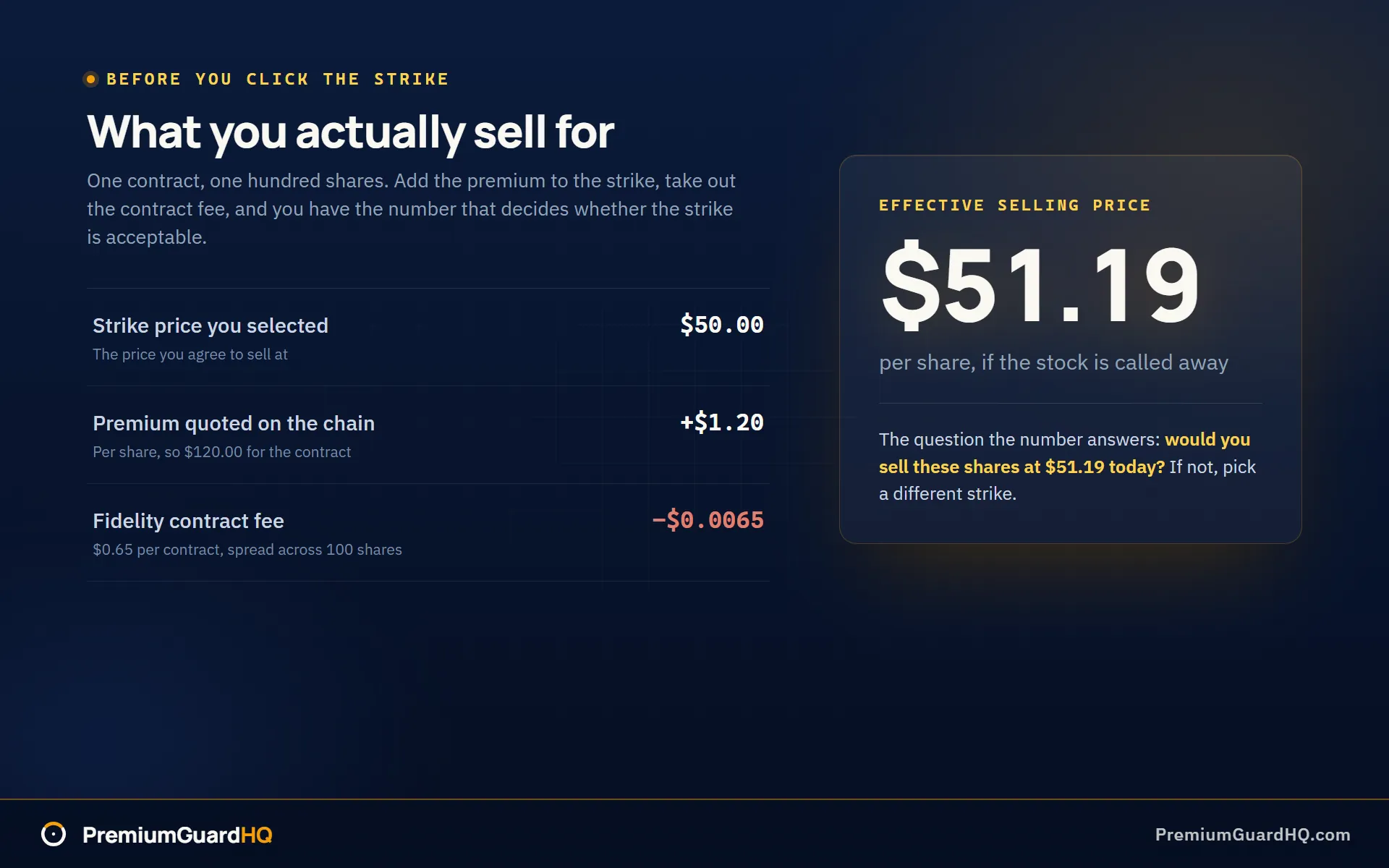
If you would rather not run that arithmetic by hand on every strike you consider, you can check the effective selling price before you commit to a strike and compare a few rows side by side.
Ask yourself one question at this point: if your shares get called away at this strike, are you fine with that outcome? If yes, keep the row selected. If not, choose a different strike or expiration date and run the math again.
Here is the trade-off in plain terms. A strike near the stock’s current price usually pays more premium. It also raises the chance your stock gets called away sooner, capping how much more money you could make if the stock keeps rising. A strike further from the current price pays less premium, but leaves the stock more room to rise before you would have to sell.
At this point you should have one specific contract selected. For example: “XYZ, October 17 expiration, $50 strike.” That is the contract you will carry into the order ticket next. There, you will submit it as a Sell to Open order, which opens a new trade by selling this call, and confirm that it fills.
Step 4: Place a sell-to-open order and confirm the fill
Your contract is picked. Now turn it into a live order. On the order ticket from Step 3, find the Action field. Set it to Sell to Open. That tells Fidelity you are opening a new short call position rather than closing one you already had. A short call means you are selling someone the right to buy your stock at a set price.
Set the quantity to match the contracts your shares cover from Step 1. One contract covers 100 shares. If you own 250 shares, enter 2, not 3. Fidelity will allow you to sell more contracts than your shares support. The extra contracts become a naked call, which is a much riskier trade with open-ended losses. Do not let that happen by mistake.
Choose your order type. Use a limit order here instead of a market order. A limit order lets you set the lowest premium you will accept. Premium is the cash you collect for selling the call. With a limit order you control your price instead of taking whatever the market offers in that moment. If you use a limit, enter a price close to the bid you saw in the option chain.
Check the time in force setting. This tells Fidelity how long to keep working your order. Day cancels the order if it has not filled by market close. Good til canceled, where offered, keeps trying across several days. Pick the one that matches how patient you want to be.
Before you submit, Fidelity shows a trade preview screen. Treat it as your last checkpoint. Confirm every detail:
- Symbol, expiration date, and strike price match what you picked in Step 3
- Action reads Sell to Open
- Contract quantity matches your share coverage
- Estimated premium credit, which is the cash you will collect
- Listed fees for the trade
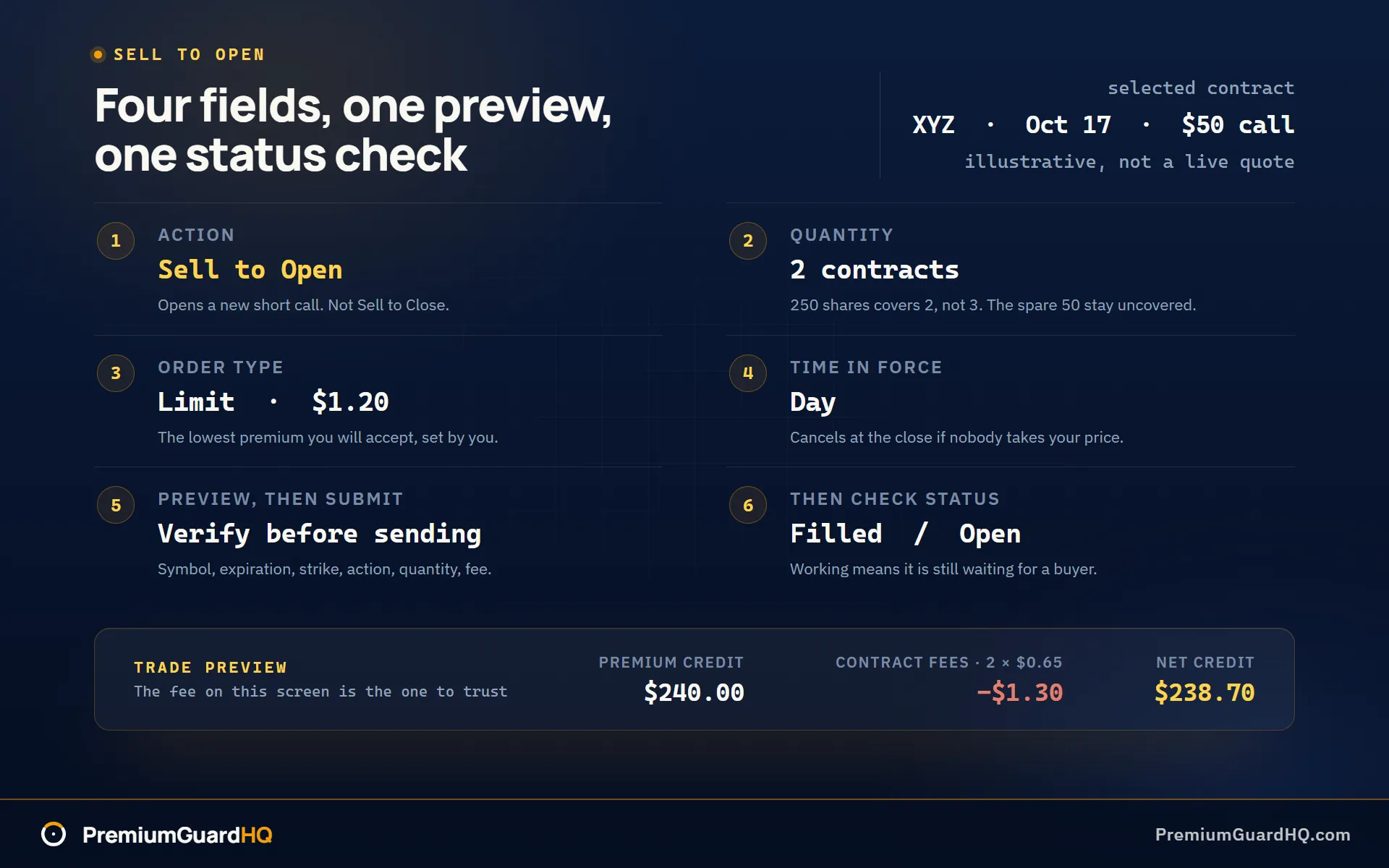
Trust the preview on cost. Fidelity’s published rate is $0.65 per contract, but the number on this screen is what you will actually pay on this order.
Click Submit if everything looks right. Fidelity sends the order for processing.
After that, confirm the result. Open your Order Status or Activity page. The order will show as Filled when it is done. It may show Open or Working while it is still waiting for a buyer at your price. If it is partially filled, the remaining contracts stay open until they fill or you cancel them.
You should now have a submitted covered call order. In Fidelity, its status shows filled, open, or working, with the correct symbol, expiration, strike, and contract count once it fills. The same order looks different elsewhere: the Schwab version of this ticket runs through either the All-In-One Trade Ticket or thinkorswim. Next, confirm that the new position appears correctly.
What you should see after a successful covered call order
Open Positions and Orders in Fidelity to check your work. The order should show as Filled. That means the trade is complete and your call contract is live.
Next, check Positions. Your original shares should still be there, untouched. A covered call does not sell your stock; it just adds a promise on top of it. You will also see a new short call position. Confirm it lists the same ticker, expiration date, strike price, and number of contracts you picked earlier.
Look at your cash balance. You should see a credit equal to the premium shown on your trade preview, minus fees. That cash is yours to keep no matter what happens next.
Keep in mind: if your stock closes above the strike price at expiration, you may be assigned. Assignment means your shares get sold at the strike price, whether you want to sell them or not.
If you run this trade across more than one broker, PremiumGuardHQ uses a read-only Fidelity connection and helps keep the math straight across every account.
Frequently asked questions
What options level do I need to sell covered calls on Fidelity?
Covered call writing requires Level 1, the lowest tier Fidelity offers. Most funded accounts already have this by default, but confirm your own level under Account Features in your Fidelity profile before you trade. If you do not see any options approval listed there, apply for options trading first. See Step 1 above for the full walkthrough.
Why don’t I see “Sell to Open,” or why won’t Fidelity let me place the covered call?
The most common cause is that options approval is missing. Check that Level 1 shows under your account. The second most common cause is holding too few shares. You need at least 100 shares per contract, in the same account you are trading from. A mismatch between accounts, such as shares sitting in an IRA while you are trading from a brokerage account, will also block the order. Double-check you are on the options trade ticket and have selected calls, not puts, on the option chain. If you have confirmed all of this and the order still will not go through, contact Fidelity support. Some accounts carry additional restrictions tied to your specific situation.
How much does it cost to sell a covered call on Fidelity?
Fidelity charges $0.65 per contract on online options trades, with no separate base commission, plus small regulatory and exchange fees that apply to most options orders. Those regulatory numbers change, so check Fidelity’s commissions page for the current schedule. More importantly, always check the trade preview screen before you submit. It shows the exact fee for that specific trade, and that number is the one to trust over any general rate you find elsewhere.
Can I sell covered calls on ETFs on Fidelity? Is that the same as a Fidelity covered call ETF?
Yes, you can sell covered calls on an ETF the same way you would on a stock, provided options are listed for that ETF and you own at least 100 shares per contract. The steps match the ones in this guide.
A “covered call ETF” is something different. That is a fund that runs its own options strategy inside the fund itself. You just buy shares of it. You are not writing any calls yourself. Cash-secured puts are a different strategy entirely, with its own approval requirements, and our explainer on how a cash-secured put works covers that in more detail.