
The wheel strategy looks simple on a spreadsheet. You sell a put, which is a promise to buy a stock at a set price. You collect the premium right away. That’s the cash you get paid upfront for making that promise. Then maybe the stock gets assigned to you, so you sell a covered call, and the cycle repeats. But the moment you roll a position or get assigned, “simple income” turns into a pile of numbers you can’t fully explain, even to yourself.
An options wheel tracker shouldn’t be judged on which one has prettier charts. It should be judged on which one gives you numbers you can actually trust when someone asks what you made this quarter.
This comparison was written by the PremiumGuardHQ team. We cite QuantWheel’s public pricing and feature claims, we call out where QuantWheel wins, and we label anything we could not verify. By the end, you will know which wheel tracker fits how you trade.
Verdict
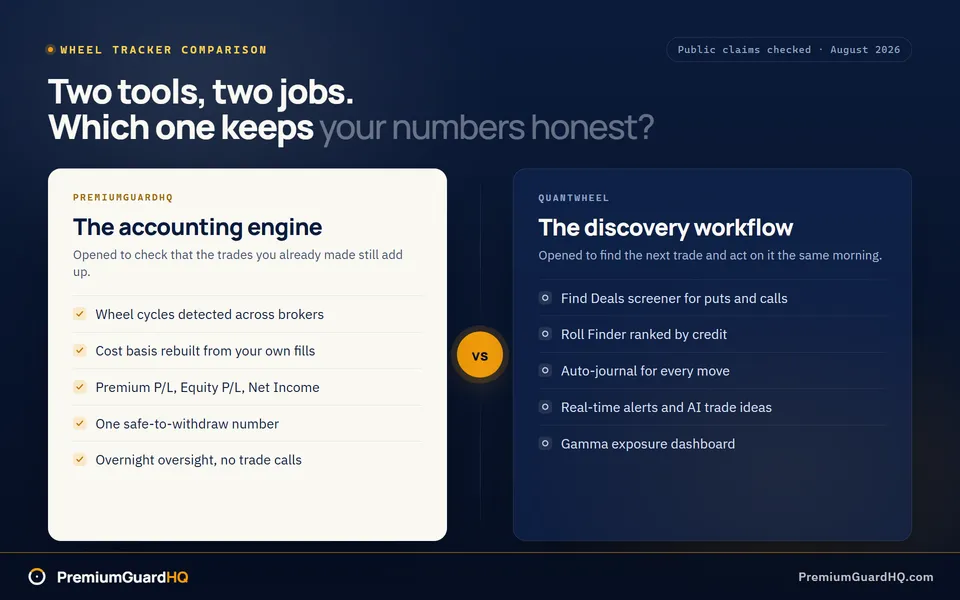
PremiumGuardHQ is the better options wheel tracker if you need correct wheel-cycle accounting, a cost basis you can trace back to real trades, and one clear number for how much you can safely withdraw as income. QuantWheel is the better pick if you want trade discovery and roll alerts built into your daily workflow.
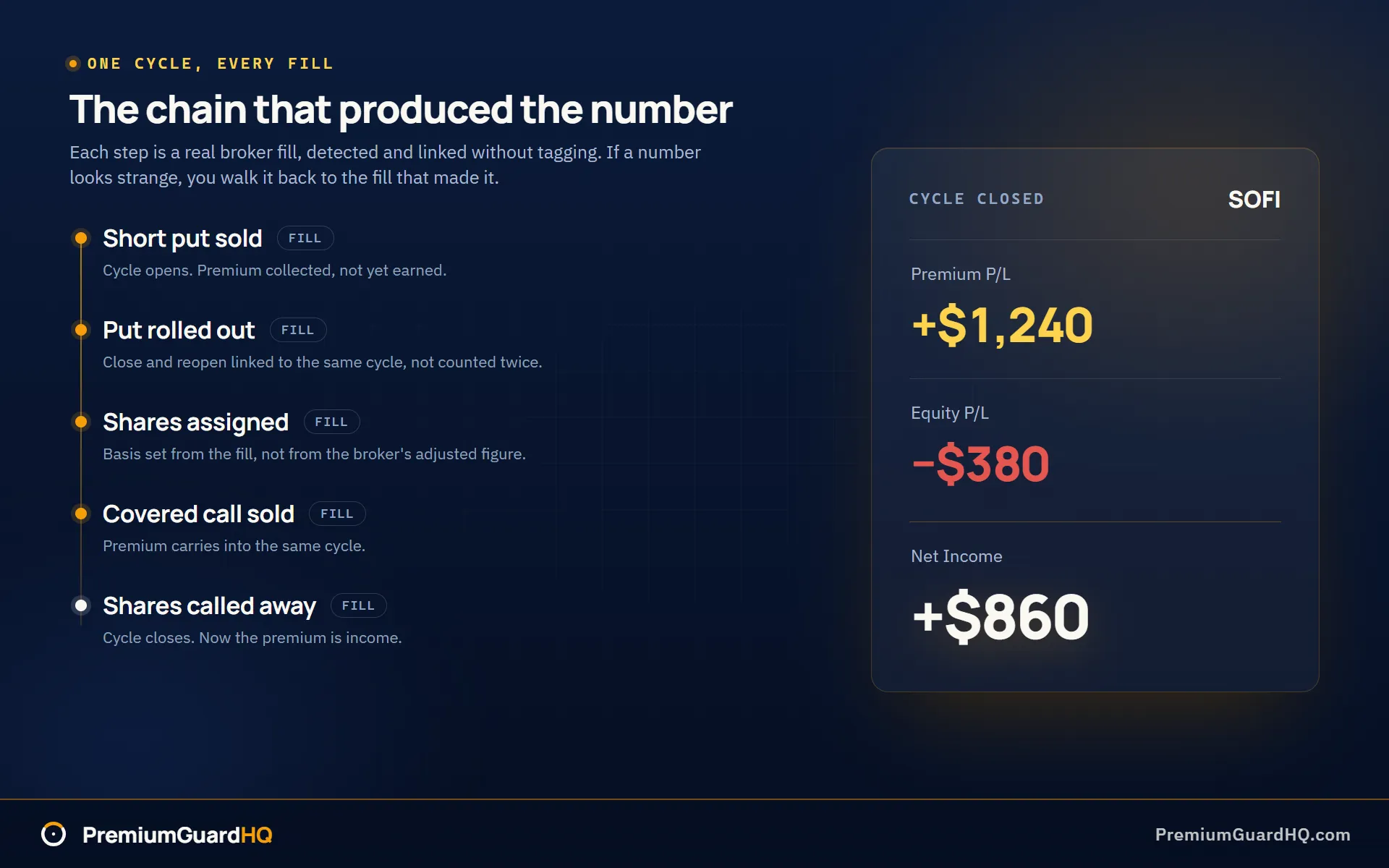
That difference comes down to what each tool is built to do. A wheel cycle is the full loop of selling a put, maybe getting the stock, then selling calls on it until it sells again. PremiumGuardHQ auto-detects these cycles across your brokers and fixes cost-basis errors that brokers often get wrong. It then shows three numbers per cycle: Premium P/L, Equity P/L, and Net Income. Premium only counts as real income once a cycle actually closes, not the moment you collect it.
If your main goal is finding new trades and getting alerts to roll them, that is not what PremiumGuardHQ is built for. QuantWheel advertises tools for finding new trades, a roll finder, suggested actions, AI trade ideas, and real-time alerts, all inside one workflow, as of August 2026. For traders whose priority is discovery over accounting, that setup fits better.
PremiumGuardHQ vs QuantWheel at a glance
Here is the fastest way to see whether you need an operator-grade wheel accounting engine, which is PremiumGuardHQ, or a wheel workflow built around finding trades and roll ideas, which is QuantWheel.
| Dimension | PremiumGuardHQ | QuantWheel |
|---|---|---|
| Best-fit focus | Wheel accounting: cycles, income math, oversight | Wheel workflow: finding puts and calls to sell, roll finder, journal, alerts, AI ideas |
| Free plan | Free forever: broker auto-sync, CSV import, open-position tracking, live quotes, basic dashboard, last 20 closed cycles | Sandbox free: demo data, delayed GEX data, capped at 5 results per feature, no signup needed |
| Trial | Pro plan: 14-day free trial, no card needed | $1 for 7 days, advertised trial offer |
| Paid price for wheel sellers | Pro: $49/month or $470/year | QuantWheelPRO: $37/month or $451/year, page shows a struck-through $47 |
| Separate GEX product | Not offered as a separate tier | QuantWheelGEX: $19/month or $228/year. GEX stands for gamma exposure. It measures how much options positioning could push a stock’s price around |
| Broker sync posture | Read-only broker connections. The tool cannot place trades, by design | Advertises read-only connections and a “never sees your password” claim |
| Brokers named publicly | Schwab, Interactive Brokers, Robinhood, Fidelity, and tastytrade, plus CSV import | Fidelity, Robinhood, Schwab, E*Trade, Interactive Brokers, tastytrade, plus a “14+ US brokers” claim |
| Safe withdrawal number | Safe Withdrawal Engine calculates the exact amount you can withdraw without shrinking your equity target | Not mentioned on the pages we reviewed |
| Overnight risk oversight | Automated Insights reads every account overnight. It flags earnings during expiration week, short puts drifting close to the stock price, positions growing past your own size limit, and trades drifting from your stated plan | Real-time alerts are advertised, but the exact rules and how often they check are not documented in our research |
QuantWheel’s numbers above come from its own public pricing and landing pages, checked as of August 2026. Rows marked “not mentioned” or “not documented” mean we could not confirm that detail publicly. That’s a gap in what QuantWheel has published, not a strike against the product.
Wheel accounting accuracy and adjusted cost basis
Here is the question that matters most once you have run the wheel for a while. You roll a put, get assigned, and later sell the stock through a covered call. Can you still trust your cost basis? Cost basis is the price you paid for a stock, adjusted for anything that changes it later, like the premium you collected. Can you trust your profit and loss number, or are you just looking at a number your broker got wrong?
This matters because premium is not automatically income. It only becomes real income once a full wheel cycle closes. Until then, you are looking at a snapshot, and a broker’s snapshot is often wrong.
QuantWheel speaks directly to this pain point. Its site describes itself as wheel and covered call software that helps traders “auto-journal every move” and skip “messy spreadsheets.” It calls out “forgetting the real cost basis after adjustments” as a common problem traders face, as of August 2026. QuantWheelPRO also advertises a “Complete Options Journal” and “Broker-integrated Portfolio Insights & Suggested Actions” on its pricing page, as of the same date. That tells you QuantWheel knows cost-basis confusion is a real problem worth solving.
What we could not find in QuantWheel’s public pages is how it actually solves it. There is no documentation of its exact cost-basis method, whether it adjusts for wash sales, how it defines a “wheel cycle,” or whether it can show you a ledger that traces every dollar back to an actual fill. A wash sale is a tax rule that can distort your cost basis when you close and reopen similar positions. A ledger is a record of trades that proves where each number came from. We are not saying QuantWheel lacks these things. We are saying they are not something we could verify from what QuantWheel has published.
PremiumGuardHQ builds its entire structure around this exact problem. It automatically detects every wheel cycle across all your connected brokers. It backfills your full trading history the moment you connect, with no manual tagging required. It separates true wheel cycles from standalone trades and short-lived, same-day cycles on its own.
From there, PremiumGuardHQ builds your cost basis from your own fills instead of inheriting the broker’s version of it. Brokerages reshape cost basis for wash sales and premiums received, which is exactly why the number on a broker screen often disagrees with what the wheel actually did. PremiumGuardHQ leaves those adjustments out and applies one of three formulas instead, chosen by how the shares were acquired, and the formulas behind every number are published. Every cycle comes with its own trade ledger, so if a number looks strange, you can trace it back to the actual fills that produced it. On top of that, PremiumGuardHQ reports three numbers for every cycle: Premium P/L, Equity P/L, and Net Income. Those are numbers built to survive a conversation with your accountant, not just a glance at a dashboard.
Winner: PremiumGuardHQ, because it treats cycle detection and reconciled, fill-traceable cost basis as things you can see and check, not a background promise. QuantWheel may still serve you well if your priority is an auto-journal and a daily workflow. But based on what its public pages show us, it has not documented the accounting methods behind its numbers.
Income math and paying yourself from premium
Here’s a question every wheel seller asks eventually: “What did I actually make this quarter, and how much can I safely take out of the account?” That sounds simple. It isn’t. Most trackers stop at profit and loss, the total gain or loss on your trades. They never answer the harder question: how much of that profit is really yours to spend without shrinking the pile of money that makes the next trade possible?
QuantWheel’s public pages talk about “consistent options income” and describe a workflow built around finding trades, watching for setups, sending roll alerts, and surfacing covered call opportunities, as of August 2026. QuantWheelPRO adds broker-integrated portfolio insights with suggested actions, a full options journal, real-time alerts, and AI-generated trade ideas through a feature called QW Intelligence, according to its pricing page from the same date. That’s a workflow built for finding your next move.
We could not find a withdrawal calculation anywhere in QuantWheel’s public pages. There’s no mention of splitting premium income from equity swings, and no rule stating that premium only counts as earned once a full wheel cycle closes. That doesn’t mean QuantWheel can’t do this somewhere behind the login. It means it isn’t part of the story QuantWheel tells in public, as of August 2026.
PremiumGuardHQ was built around a different question: not what trade to make next, but what the wheel actually paid, and what you can take out without hurting it. It treats option premium, the cash you collect for selling an option, as real income only once a full wheel cycle closes. Not the day you sell the put. Not the day the stock gets assigned to you, meaning you’re forced to buy or sell the shares. Only when the cycle finishes.
To make that real, PremiumGuardHQ computes three numbers meant to stay honest through assignment and through drawdowns. A drawdown is a stretch where your account value drops from a recent high. Those three numbers are Premium P/L, Equity P/L, and Net Income. Split apart like that, you can finally see how much of your result came from collecting premium and how much came from the stock itself moving up or down.
The flagship piece is the Safe Withdrawal Engine. You set an equity target, the amount of capital you want to protect and keep working. The engine then calculates the exact dollar amount you can withdraw from profits that have already closed out, without pulling your account below that target.
This solves a quiet problem a lot of wheel traders don’t notice until it’s already hurt them. If you withdraw premium as income during a drawdown, you can slowly drain the very capital that generates your future income. The account still looks fine on the surface. Underneath, the engine that produces your paycheck is shrinking.
Winner: PremiumGuardHQ, because among the tools compared here, it’s the only one that commits to an actual safe-withdrawal number tied to closed-cycle results and a target you set yourself.
One note: none of this is tax advice. It’s cash management for people running the wheel like a business, not a recommendation about what to do with your money.
Automation, oversight, and drift from your own rules
Will you catch the quiet mistakes before they add up? Things like too much money in one stock, an earnings report landing right before your options expire, or a short put creeping close to the stock’s price without you noticing. A short put is a promise to buy a stock at a set price. If the stock price drops close to that price, the chance you get assigned the shares goes up. These small slips are the real way the wheel strategy goes wrong for people who trade it seriously.
QuantWheel builds its workflow around what it calls “actionable insights.” Its site shows cards like “Risk of Assignment,” “Roll Alert,” and “Covered Calls to Sell.” Rolling means closing an option early and opening a new one, usually to buy more time or move the strike price. QuantWheel frames the whole product as turning your portfolio into a daily workflow, as of August 2026. QuantWheelPRO adds “Real-time Alerts” and a “Roll Finder.” Its pricing page says the roll workflow helps traders avoid bad assignments, as of the same date.
We could not find the exact rule behind each alert on QuantWheel’s public pages. There’s no documentation showing whether an alert displays the real numbers behind it. There’s also no mention of a strategy baseline you set yourself that the system then checks your trades against. QuantWheel may track this somewhere we did not see. We just cannot confirm it from what is published.
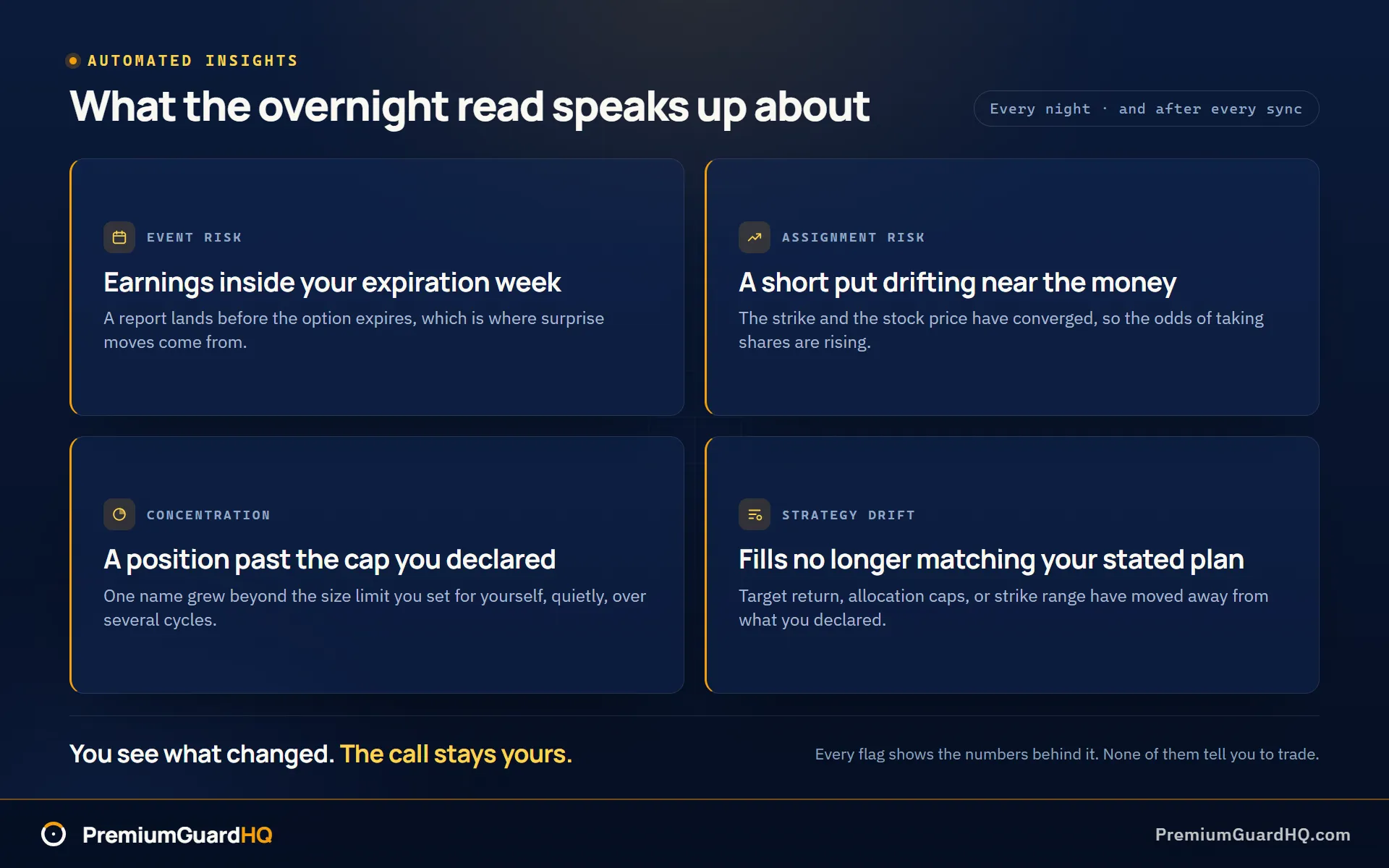
PremiumGuardHQ takes a different approach. It reads your accounts overnight, every night, and after every sync, then tells you exactly what changed. Overnight means the review happens automatically while you sleep, so you open the app to a report instead of doing the checking yourself. This is part of a feature called Automated Insights, available on the Pro plan.
Here is the drift it flags:
- An earnings report landing inside an options expiration week, a common source of surprise price moves priced into fat premium
- A short put whose strike price has drifted close to the stock’s current price, meaning assignment risk is rising
- A position growing past the size limit you declared for yourself, so concentration creeps in without you noticing
- Trades that no longer match the strategy you originally declared, whether that is your target return, your allocation caps, or your usual strike range
The important part is what PremiumGuardHQ does not do. It does not tell you to roll a position. It does not tell you to close a trade. Every insight shows you the exact numbers behind it, then leaves the decision with you. As the platform puts it: “You see what changed. The call stays yours.”
Winner: PremiumGuardHQ, because it ties overnight oversight to rules you declared yourself, and shows the numbers behind every flag rather than just naming a condition. QuantWheel may still be the better fit if what you want is real-time alerts and a roll-finding workflow. But the exact monitoring rules behind those alerts are not something QuantWheel has published for us to verify.
Finding trades, rolling, and daily workflow speed
Ask yourself one question before picking either tool: do you open your tracker to find your next trade, or to check that your existing trades are still behaving? That answer decides which platform fits you.
QuantWheel is built for the first kind of session. Its landing page walks through a full workflow: Define Outcomes, Find Deals, Roll, Sell Calls, Auto Journal, and Copy & Share. This is current as of August 2026. That’s a tool meant to stay open while you hunt for your next trade, not just check on old ones.
QuantWheelPRO backs this up with a real feature list. It offers a “Full Wheel Lifecycle” that helps you find cash-secured puts and covered calls. A cash-secured put is a promise to buy a stock at a set price. A covered call is a promise to sell stock you already own at a set price. QuantWheelPRO also includes a Roll Finder to help you avoid getting assigned shares you didn’t plan for, broker-integrated Portfolio Insights with Suggested Actions, real-time alerts, and QW Intelligence, described as AI-generated trade ideas.
QuantWheel also sells a separate QuantWheelGEX tier built around a gamma exposure heatmap and related alerts. Gamma exposure is a measure of how much options positioning could push a stock’s price around. QuantWheelPRO folds in unlimited GEX features plus options flow data. All of this is current as of August 2026. If your morning routine is “show me what to sell today,” this is a lot of firepower built for exactly that question, all in one dashboard.
PremiumGuardHQ is not built to answer “what should I trade next.” It says so directly: it is not a signal service, not a robo-advisor, and not a brokerage. It won’t hunt for your next put or suggest a roll. Instead, it keeps the math honest behind the trades you’ve already decided to make. It syncs your brokers automatically, detects your wheel cycles without you tagging anything, reconciles your numbers so they’re actually correct, and reads your accounts overnight to flag anything drifting from your own plan.
The promise behind all of this is time. The bookkeeping runs itself in the background, so the hours you spend on the wheel go to decisions instead of data entry.
So the winner here depends entirely on what you open the app to do. If you want a tool that finds your next cash-secured put, catches roll opportunities, and hands you AI-generated ideas alongside real-time alerts, that’s a job PremiumGuardHQ was never built to do.
Winner: QuantWheel, for traders who want trade discovery, roll workflow, and alerts built into the platform itself. PremiumGuardHQ wins instead if your trading process already exists and what you need is the tracking, the accounting truth, and the supervised drift detection that keeps that process honest.
Pricing, free tiers, and the lowest-risk way to evaluate
Before you connect a real brokerage account to anything, you want a cheap, low-risk way to see if a tool actually helps you. That’s a fair instinct. Wheel traders, people who repeatedly sell cash-secured puts and covered calls on stocks they own, have good reason to be careful with new software.
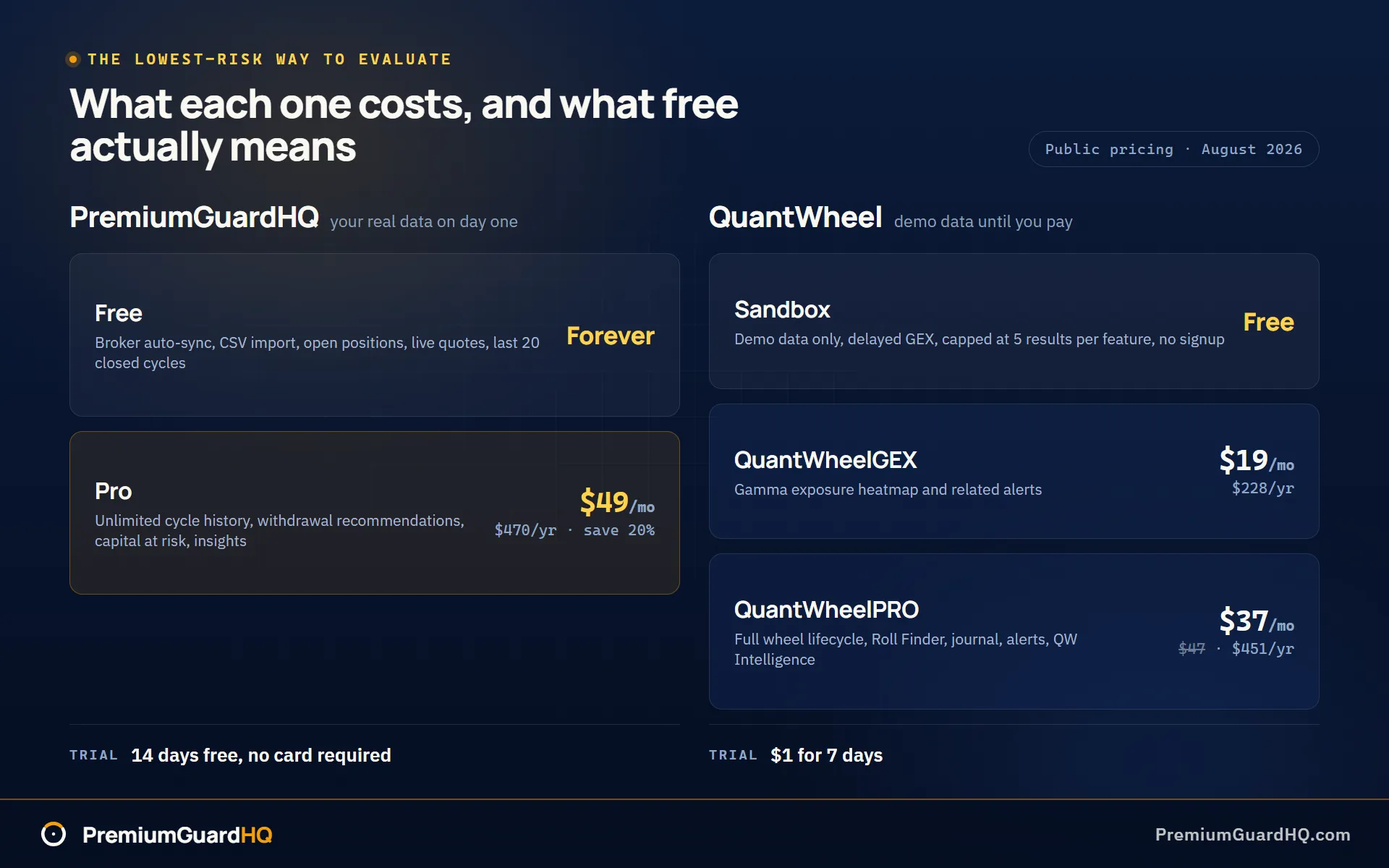
QuantWheel offers a Sandbox plan that costs nothing forever. You don’t need to sign up or enter a card. It runs on demo data instead of your real trades. It includes delayed GEX data, a measure of how much option dealers may need to buy or sell stock to stay hedged. It caps you at 5 results per feature, as of August 2026. That’s enough to click around and see how the discovery workflow feels: the roll finder, the trade ideas, the alerts, all without connecting anything real.
Once you’re ready to try it with your own account, QuantWheel advertises a “$1 for 7 days” trial on its paid plans. After that, QuantWheelPRO lists at $37 a month or $451 a year billed annually, with a struck-through $47 shown as the regular price. QuantWheelGEX, the separate gamma exposure tier, lists at $19 a month or $228 a year, as of the same date.
PremiumGuardHQ works differently from the start. The free tier is free forever, and it doesn’t ask for a card. Unlike QuantWheel’s Sandbox, it isn’t demo data. You can sync a real broker or drop in a CSV file and get broker auto-sync, open-position tracking, live quotes, basic dashboard numbers, and your last 20 closed cycles. All of that is included at no cost.
If you want the full picture, Pro costs $49 a month or $470 a year, a 20% savings over paying monthly. The trial runs 14 days with no credit card required. Cancel is one click. PremiumGuardHQ doesn’t send retention emails or throw up exit pop-ups trying to talk you out of leaving. That’s a deliberate stance, not an oversight. A tool built to show you honest numbers shouldn’t need tricks to keep you signed up.
Here’s the difference in practice. QuantWheel’s Sandbox lets you test the discovery workflow risk-free, but with fake data and no card needed. PremiumGuardHQ’s free tier lets you plug in your actual trading history from day one, also with no card needed, but it skips the discovery features entirely.
Winner: PremiumGuardHQ, for the simplest path to a real-account trial with your own synced data and nothing to cancel later. If what you want first is to test whether QuantWheel’s discovery workflow fits how you trade, its Sandbox is a fair, low-risk place to start before you ever reach for your card.
A sensible plan: open PremiumGuardHQ’s free tier, sync a broker or drop in a CSV, and look at your own numbers. Separately, try QuantWheel’s Sandbox to see if its trade-finding workflow is something you’d actually use daily. Decide only after you’ve seen both with your own eyes.
Choose based on how you trade
Pick the profile below that matches how you actually trade. Each one points to a clear answer.
The income operator who pays yourself from the wheel
Choose PremiumGuardHQ if you need premium income kept separate from stock price swings. Premium is the cash you collect for selling an option. You also want cycle-by-cycle numbers you could defend to an accountant, plus one clear dollar amount you can safely withdraw without shrinking the account that produces it. PremiumGuardHQ builds this from three numbers, Premium P/L, Equity P/L, and Net Income, plus the Safe Withdrawal Engine that sits on top of them.
The spreadsheet migrant tired of falling behind on tagging
Choose PremiumGuardHQ if you’re done manually tagging trades and rebuilding your history every time a stock gets assigned or a position rolls. Assignment happens when you’re required to buy or sell the stock because the option you sold got exercised. A roll means closing one option and opening a new one to extend or adjust a trade. PremiumGuardHQ auto-detects your wheel cycles across brokers and keeps a reconciled ledger where every number traces back to a real trade.
The trader who wants the tool to surface trades day to day
Choose QuantWheel if what you want most is a tool that hands you trade ideas while you work. QuantWheelPRO advertises a “Find Deals” feature, a Roll Finder, real-time alerts, and QW Intelligence, its AI-generated trade-idea feature. All of this is built into one daily workflow, as of August 2026.
The cautious evaluator who isn’t ready to connect a broker
Choose QuantWheel first if you want to try the tool before linking a real account. Its Sandbox plan is advertised as free, with no signup and no card required. It runs on practice data only and caps how many results you can see per feature, as of August 2026. That’s a fair way to get a feel for the workflow before you commit anything real.
Whichever profile matches your habits, that’s the tool worth trying first.
Frequently asked questions
Is PremiumGuardHQ better than QuantWheel?
It depends on what you need most. PremiumGuardHQ is the stronger pick for cycle accounting accuracy, a cost basis you can trace back to real trades, and income math like the Safe Withdrawal Engine, which tells you exactly how much you can pay yourself without shrinking your account. QuantWheel can be the better pick if you want trade discovery, roll ideas, alerts, and AI prompts built into one daily workflow, as of August 2026. See the sections above for the full breakdown of each.
Does QuantWheel have a real free plan?
QuantWheel advertises a Sandbox plan that’s free forever, with no signup or card required, as of August 2026. But it runs on demo data, not your real trades. It also uses delayed GEX data, a measure of options positioning, and caps you at 5 results per feature. Sandbox is not the same as syncing your live broker account. We could not confirm from QuantWheel’s public pages what live-account features are available without upgrading.
Can either tool connect to my broker, and are they read-only?
Yes, both advertise read-only broker connections, meaning neither can place trades on your behalf. PremiumGuardHQ’s integrations are read-only by design and include Schwab, Interactive Brokers, Robinhood, Fidelity, and tastytrade, plus CSV import for other brokers. QuantWheel advertises read-only connections too, and as of August 2026 lists examples including Fidelity, Robinhood, Schwab, E*Trade, Interactive Brokers, and tastytrade.
Will either tool tell me what to trade?
PremiumGuardHQ won’t. It’s built to flag conditions and show you the numbers behind them, but the decision always stays with you. QuantWheel’s marketing does promote suggested actions, a roll finder, and AI-generated trade-idea prompts, as of August 2026. Neither approach is inherently better. It comes down to whether you want a tool that hands you ideas or one that just keeps your existing decisions honest.
Do these tools solve wash sales and tax reporting for wheel traders?
A wash sale is a tax rule that can distort your cost basis when you close and reopen similar positions. QuantWheel’s public pages don’t document how it handles wash sales specifically, as of August 2026. PremiumGuardHQ takes a deliberate position here: it does not carry the broker’s wash-sale and premium-received adjustments into your cost basis at all. It builds basis from your own fills instead, which is why its number can disagree with the one on your broker screen. That said, this article isn’t tax advice for either tool. The safest approach is to use whichever tracker gives you a clean, truthful ledger, then bring that trade ledger to a tax professional.
Should I just use an options tracking spreadsheet instead?
Spreadsheets can work for a while, but they tend to break down once rolls and assignments pile up. Independent spreadsheet guides point to manual entry, fragile formulas, and the difficulty of tracking live Greeks, which are risk measures for options, inside a spreadsheet. If you’re staying on a spreadsheet for now, adopt one rule: never let “I’m behind on entries” become your normal state. That’s usually where decisions start getting sloppy.