
You want to practice the wheel without risking real cash. Smart move. But most “stock simulators” cannot actually run a wheel trade.
The wheel strategy has two parts. First, you sell a cash-secured put, which means you promise to buy 100 shares at a set price if the stock drops that low. Second, once you own the shares, you sell a covered call against them. Many free options trading simulator tools only let you buy and sell shares, or maybe buy a basic call option. They were never built to sell puts, track assignment, or let you roll a covered call. You will open one up, search for the option chain, and find nothing.
This guide shows you what a real options trading simulator needs to run the wheel. You will learn the features that separate true practice tools from basic stock-picking games. Then you will see one full paper trade, from selling the put, to assignment, to selling the call. One important note: paper trading sharpens your skills and process. It does not prove the strategy will make you money.
What is an options trading simulator
An options trading simulator is a practice platform that gives you fake money and real or delayed market prices. You use it to place options trades, including puts, calls, and sometimes multi-leg trades, without risking real cash. No actual money ever changes hands.
For wheel traders, one question matters most. A wheel trade means selling a cash-secured put, which is a promise to buy stock at a set price if the stock falls there. Can the simulator carry you through assignment if that happens? Assignment is when you actually get handed the shares. And after that, can it let you sell a covered call against those shares, which means promising to sell them later at a set price? If the simulator cannot walk through that whole loop from start to finish, it is not built for this strategy.
You will also see the terms “paper trading,” “virtual trading,” and “demo account.” People use these words to mean the same thing. The quality still differs a lot from one platform to the next. Some give you real-time quotes and full options chains, which is the full list of available strike prices and expiration dates. Others use delayed data and limited order types.
One more thing worth clearing up. A simulator is not the same as an options calculator. A calculator only estimates what a trade might be worth at a different price or date. A simulator actually lets you place the order, hold the position, and manage it over time, just like a real account would.
How paper trading the wheel works inside a simulator
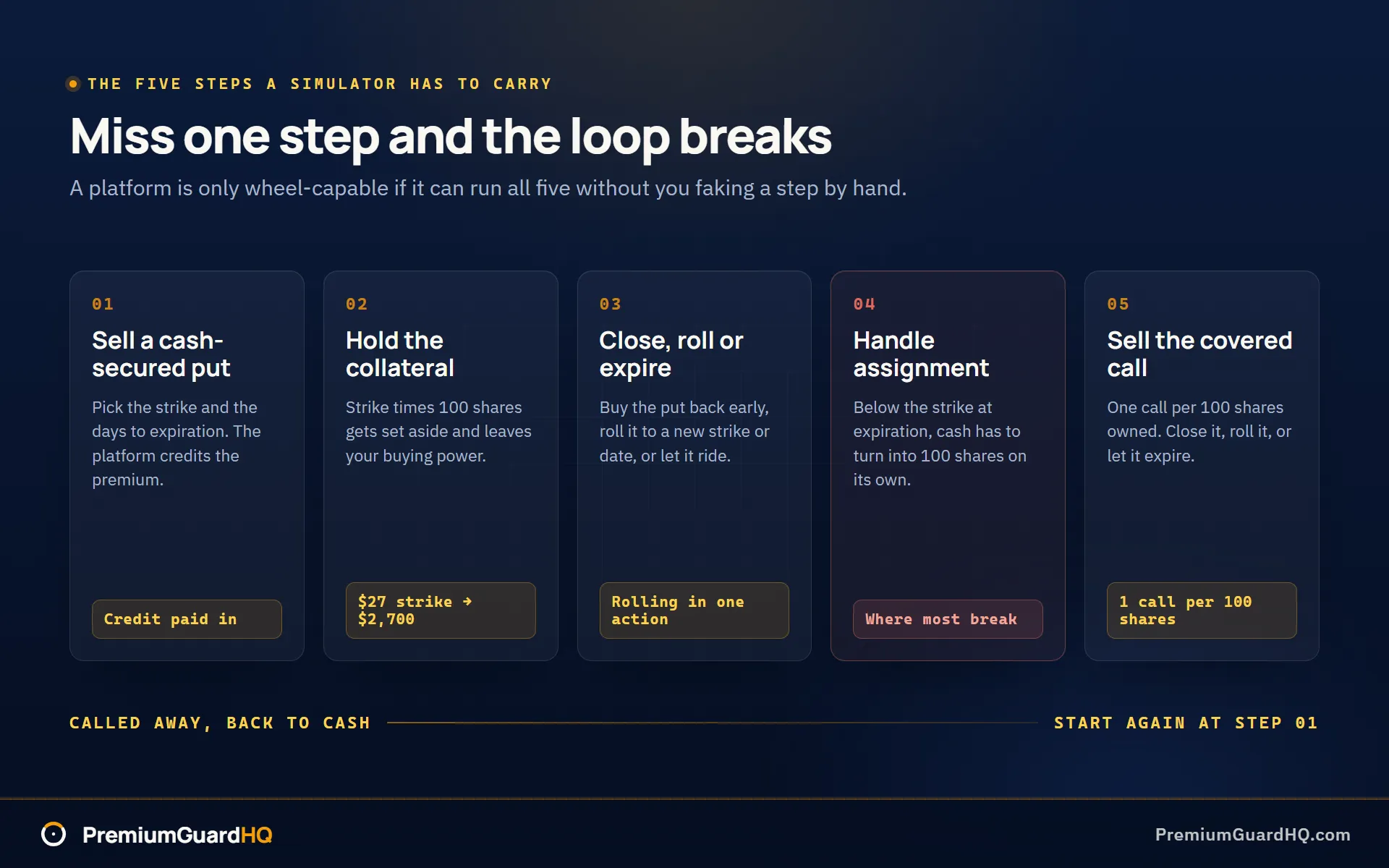
A simulator earns the right to call itself wheel-capable by doing five things in order. Miss one, and the loop breaks.
Step 1: Sell a cash-secured put. You pick a stock, pick a strike (the price you agree to buy at), and sell a put with some number of days left before it expires. Traders call this DTE, short for days to expiration. The platform credits your account with the premium, the cash you collect for selling the option.
Step 2: Hold the collateral. Cash-secured means the platform sets aside strike price times 100 shares. Sell a $27 strike and $2,700 gets locked up and unavailable for other trades. A real simulator shows this hit to your buying power, the cash left over for new trades. If you want to see that number before you ever open a practice account, the collateral math behind a cash-secured put runs the same way on a calculator.
Step 3: Close, roll, or expire. You can buy the put back early, roll it to a new strike or date, or let it ride to expiration.
Step 4: Handle assignment. If the stock sits below your strike at expiration, you get assigned. Assignment means the platform must turn your cash into 100 shares of stock, automatically, inside the paper account.
Step 5: Sell the covered call, then repeat. Now you sell one call per 100 shares you own. Close it, roll it, or let it expire. If it finishes in the money, meaning the stock price sits above your call strike, your shares get sold and you are back to cash.
The test is whether a platform can walk through all five steps without you faking a step by hand. If it cannot, it is not wheel-capable. That is the whole test. Our own free turn-based covered call simulator covers covered calls only, not the full wheel, so use it to practice managing a short call through expiration.
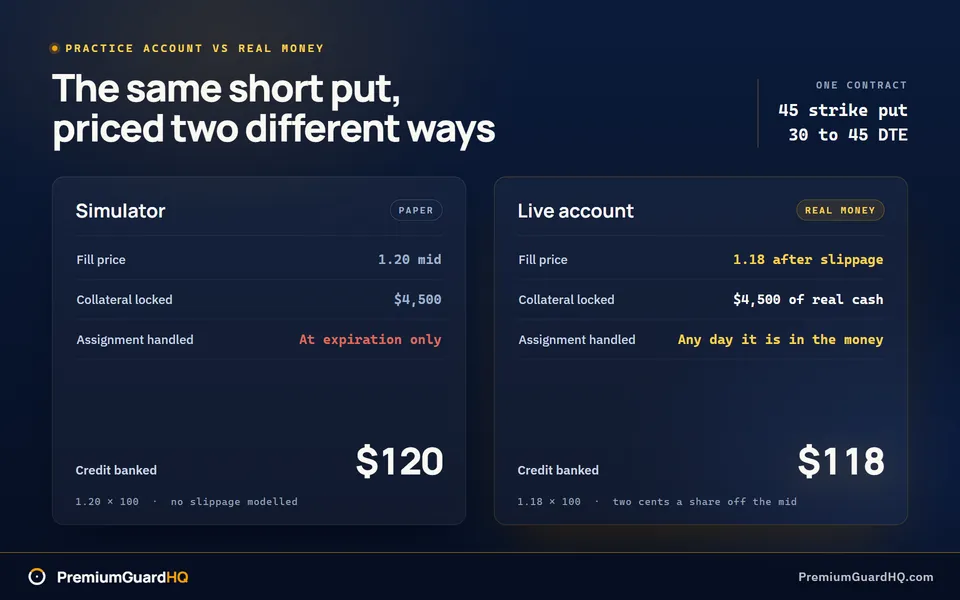
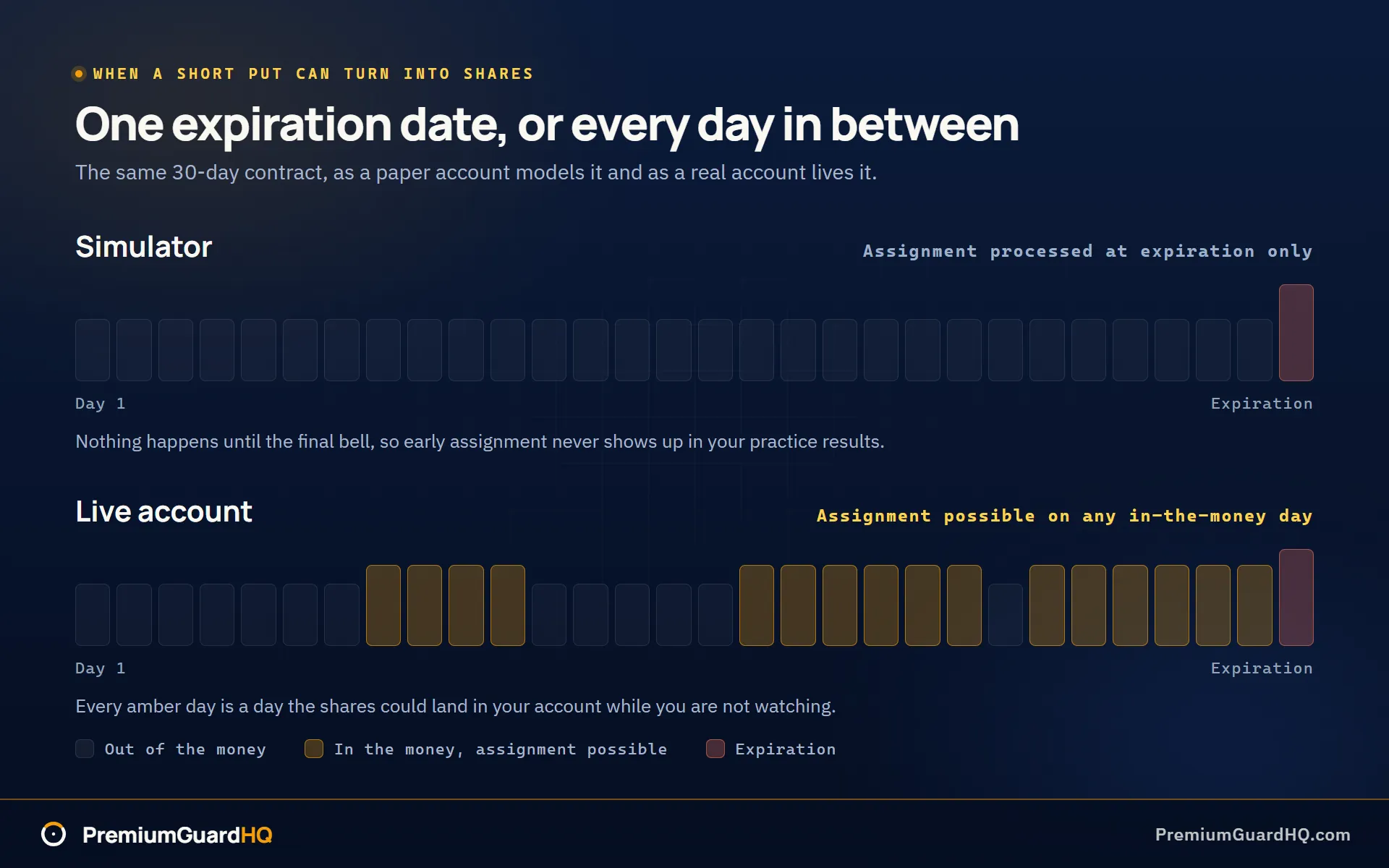
Most simulators get the basics right: order entry screens, position tracking, simple Greeks like delta, and profit and loss numbers. Delta estimates how much an option’s price moves when the stock moves one dollar. Where platforms cut corners is in two places. Fill prices often use the mid-point between the bid and the ask, the buy and sell prices on the order book, instead of the real slippage you would get in a live account. And assignment timing gets simplified: many platforms skip early assignment entirely and only process it at expiration. That hides a real risk you will face with real money, since assignment can land on any day equity markets are open, not just at the end.
The wheel support checklist: what to verify before you pick a simulator
Run any options trading simulator through this checklist before you commit to it. Skip a step and you might find out mid-trade that your practice platform cannot actually practice the wheel.
1) Can it sell puts and calls, not just buy them? Many free apps only let you buy options. That is useless for the wheel. Confirm you can place a short put, selling a put to open a cash-secured put, and a short call against shares you own, the covered call. Try placing both before you trust the platform with your time.
2) Does it enforce wheel-relevant limits? A good simulator locks up cash for your put the same way a real broker does. If your buying power does not drop when you sell a put, the platform treats it like free money, and that teaches bad habits. It should also require exactly 100 shares per covered call. If it lets you sell a call against 40 shares, it is not modeling real rules.
3) What happens at expiration and assignment? Check whether in-the-money options, meaning the stock price crossed your strike, automatically turn into shares at expiration. Check whether the platform warns you about assignment risk at all. Some simulators oversimplify this: they only process assignment at expiration and skip early assignment entirely, which hides a real risk.
4) Are the quotes real-time or delayed? A delayed options chain, often by 15 minutes, shows you a price that is not the price you would actually get right now. That gap matters more with options than stocks, since option prices move faster. Look for a label on the chain itself, or check if the platform asks you to verify your account or add a data subscription to unlock live prices.
5) Fees, pricing, and hidden barriers to entry: “Free” sometimes still means handing over your Social Security number, verifying your identity, or funding a real brokerage account before full paper features unlock. Test this directly. Try to open the paper account and place one options trade, start to finish, the same day. If you hit a wall, you will know before you waste a week waiting on approval.
6) Usability for wheel workflows: Limit orders, where you set the exact price you will accept, are non-negotiable. Market orders alone will not cut it for options. Also check how rolling works. Rolling means closing one option and opening a new one at a different strike or date. Can you do that in one smooth action, or does the platform make you track two separate trades by hand?
A simulator is your execution sandbox, the place where you place and manage trades. Tools like an option builder or options finder sit one layer above that, helping you scan for and compare trade ideas before you place one. Option Samurai, for example, works as a scanner layer, not a simulator. Keep the two separate, and you will pick the right tool for the right job.
Reality check: what paper trading cannot teach wheel traders
Paper trading means trading with simulated money on a real or delayed market. It teaches you a lot. It also lies to you in specific ways. Know these before you trust your results.
Fake fills make you look better than you are. Most simulators fill your order at the mid price. That is the number right between the buy price and the sell price. Real markets rarely give you that. In a live account, you often get a slightly worse price. This is called slippage. It means your paper profits are probably too high, and your paper exit costs are probably too low. Here is a fix: subtract a small, fixed amount from every paper trade’s profit, like $0.02 per share. Use the same number every time so your results stay honest and comparable.
Assignment on paper is just a screen update. With real money, it feels different. Assignment means a short option you sold gets exercised against you. For a cash-secured put, that means the shares land in your account and your cash disappears to pay for them. On a demo account, assignment is just a number changing on a screen. With real money, that cash is now locked up and unavailable. Most new wheel traders feel a jolt of stress the first time this happens for real, and it helps to know the mechanics behind an assignment notice before one shows up.
There is another gap here. Many paper platforms only process assignment at expiration, the date the option contract ends. In real life, a short option can get assigned early, on any day it is in the money. In the money means the stock price has moved past your strike price in a direction that favors the option buyer. Your simulator may never show you that early assignment can happen.
Slow price data can make a bad plan look great. A 15-minute delayed options chain shows you prices from the past, not right now. An options chain is just the list of available contracts and their prices for a stock. If you practice entries and rolls on old data, your trades will look smooth and easy. The same trades could be clumsy and costly with live prices, where the option chain is shifting in real time. Before you judge a platform’s wheel tools, check one thing first: are you looking at live quotes, or delayed ones?
A calculator is not a simulator, and it will not teach you either lesson above. A stock options calculator, sometimes called an options profit calculator, estimates what a trade is worth at a different price or date. That is useful for checking your break-even point before you place a trade. But a calculator never makes you enter an order. It never locks up your buying power, and it never forces you to roll a position under pressure. Those skills only come from a simulator or a live account.
Scanners and builders sit outside this whole discussion. A tool like Option Samurai is built to filter the market and surface candidate stocks and strikes, checking things like liquidity before you ever place a trade. Liquidity means how easily you can buy or sell a contract without moving its price. An options finder or option builder works the same way: it helps you locate contracts and shape a position. None of these tools execute or manage a trade. You still need a simulator or a real broker account to do that part.
Worked example: paper trading one wheel cycle
Let’s run one full cycle through a simulator, start to finish. The stock sits at $50. We use one contract to keep the math simple.
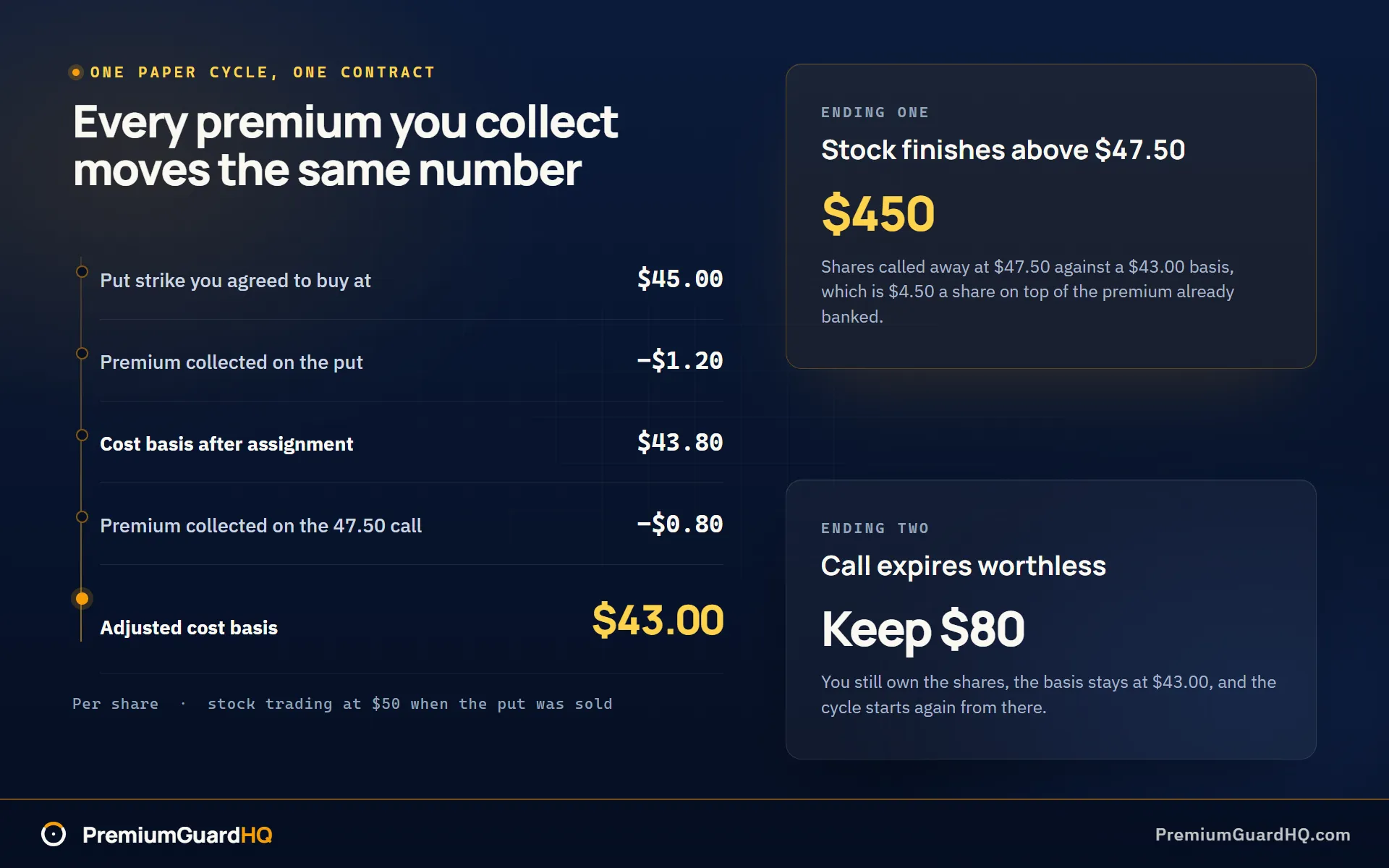
Step 1: Sell the put. You sell the 45-strike put, 30 to 45 days to expiration. That means you promise to buy the stock at $45 if it falls that far. You collect $1.20 per share, or $120 total. This is called premium, the cash you get paid upfront for making that promise. The platform locks up $4,500 as collateral, since one contract covers 100 shares at $45. If you get assigned, meaning the stock gets put into your account, your real cost is lower than $45. Subtract the premium: $45.00 minus $1.20 equals $43.80.
Step 2: Assignment happens. The stock drifts down to $44 by expiration. Since $44 sits below your $45 strike, the put finishes in the money and you get assigned. Your paper account now shows 100 shares, bought at $45, with that $120 in premium already banked.
Step 3: Sell a covered call. You sell the 47.5-strike call and collect $0.80 per share, or $80 total. A covered call means you promise to sell shares you already own at a set price. This lowers your adjusted cost basis again. Cost basis just means what you actually paid, after all premium collected gets subtracted. Take the $43.80 from step one and subtract $0.80: your adjusted cost basis is now $43.00 per share.
Step 4: Two ways this can end. If the stock finishes above $47.50, your shares get called away. That means they get sold automatically at that price. You sell at $47.50 against a $43.00 cost basis, which is $4.50 per share, or $450 total, on top of the premium already banked. If the call expires worthless instead, meaning the stock stayed below $47.50, you keep the $80 and start the cycle over with a lower cost basis.
This is where an options profit calculator earns its keep. Plug in your $43.00 break-even point and check the payoff at several stock prices before you commit to the next move. A good calculator shows your max profit capped at the call strike, and what happens if the stock drops back toward $40.
One note on realism: your simulator likely filled these trades at the mid price, the midpoint between the buy and sell price. A calculator using that same optimistic fill will match your paper results. A calculator using a more conservative fill will get you closer to what real money would actually show.
Frequently asked questions
Which simulators are most likely to support selling cash-secured puts and covered calls? Broker platforms with full options order entry, not generic stock market games, give you the best shot. Many brokers offer a paper trading mode that mirrors their real options chain, including strike selection and expiration dates. Before you commit, test two things directly. First, can you actually place a short put, meaning you sell the put instead of buying it? Second, does an in-the-money expiration (the stock price crossing your strike) automatically hand you 100 shares, so you can turn around and sell a covered call? If either test fails, keep looking.
Do options trading simulators use real-time options prices? Sometimes, but not always. Many paper trading platforms show delayed quotes by default, often by 15 minutes, and only unlock real-time data after you verify your account or add a subscription. This matters more with options than stocks, since option prices shift faster. Before you judge how good your fills look, check the options chain itself for a real-time or delayed label. See the “Reality check” section above for why delayed data can make a bad trade look better than it is.
Are paper trading fills realistic enough to validate the wheel? Good enough to learn the workflow and build discipline. Not good enough to assume your live results will match. Most simulators fill orders at the mid price, the exact midpoint between the buy and sell price, which is cleaner than what real markets usually give you. A practical fix: track every paper entry and exit with a conservative assumption, like subtracting a few cents per share from your profit, so your numbers do not lie to you. See the worked example above for how fill assumptions change your numbers.
Is Option Samurai an options trading simulator? No. Option Samurai is an options finder and filtering tool. It helps you scan the market and narrow down candidate stocks and contracts before you ever place a trade. It does not let you open a position, track assignment, or manage a covered call over time. You still need a true simulator or a broker paper account to carry a wheel position through its full cycle, from selling the put to handling assignment to selling the call.