
This guide takes you from knowing what a covered call is to placing a real options order that fills. A covered call is a promise to sell stock you own at a set price. Many beginners can explain that idea, but far fewer can log into their broker and actually get an order executed. Most feel queasy right before clicking the button because they worry they picked the wrong contract.
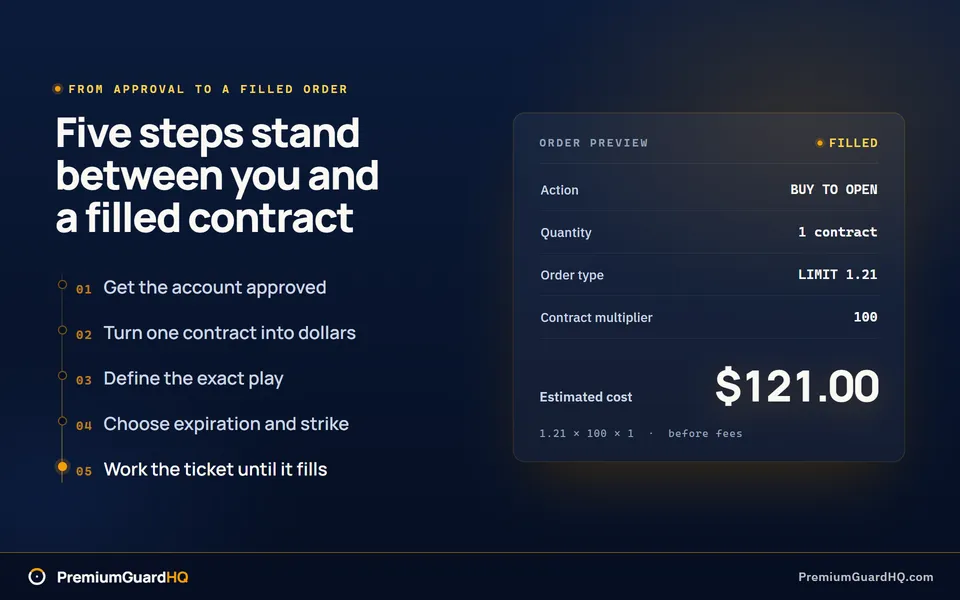
The core of how to trade options is a short sequence of steps. Get your account approved for options. Pick a contract. Read the option chain, a table that lists contracts, strikes, and prices. Then place an order that fills.
We won’t tell you which strategy to run or which stock to trade. For the reasoning behind the strategy itself, read the options wheel strategy explained end to end. If the vocabulary is still new, start with calls, puts, and why traders use them.
At the finish, you’ll have two things: an approved account and a real, filled order in front of you. The order will show the right contract, the right quantity, and the exact effect on your buying power. That is the goal.
First, prepare everything before you click buy.
Before you start
Collect these items before you open an order ticket so you aren’t hunting for them mid-trade.
Account and access
- A brokerage account that supports listed options. Listed options trade on a public exchange rather than being private deals with another party.
- Decide whether you’ll place the trade on the web, desktop, or your phone’s app.
Disclosures and permissions
- Options approval must already be active for this specific account. Brokers place approved traders into levels based on strategy risk, so confirm your level covers the trade you plan to make.
- Know where your broker stores the OCC options risk disclosure. The OCC, or Options Clearing Corporation, issues every listed option contract. You are required to read this before trading.
Funding and collateral
- Have cash ready. Buying an option uses cash to pay the premium, the price of the contract. Selling an option lets your broker hold collateral instead, based on its own rules.
- If you plan a covered call, confirm you already own 100 shares of the stock for every contract you plan to sell.
Inputs to write down first
- Write down the ticker symbol, call or put, and buy to open or sell to open.
- Set a hard cap on the number of contracts for this first trade. Decide now, not after the chain is open.
Once you have all that, open the chain and pick your first contract.
Step 1: Request options approval for the account you will trade in
Your broker must approve options trading before you place an order. Log in and find the options permissions area. Most brokers list it under account settings, trading permissions, or margin and options. If you cannot find it in two clicks, search the broker’s help site for “options application.” Every broker that offers options has one.
Complete the application. It asks about trading experience, investment goals, and risk tolerance. Answer honestly. The answers determine what the broker will allow. Understating your experience only delays you later when you want a larger trade.
Then pick the right approval level. Brokers approve order mechanics, meaning the actual order types you are allowed to place. A low level usually allows covered calls and cash-secured puts. A covered call is a promise to sell stock you already own at a set price. A cash-secured put is a promise to buy stock at a set price, backed by cash you have already set aside. Higher levels unlock spreads, which combine multiple contracts. They may also unlock uncovered positions, where you carry more risk because you do not own the stock or hold the cash to back the trade. Do not apply for the highest level. Choose the lowest level that covers the exact order you plan to place in Step 5.
Submit the application and wait. Depending on the broker, approval may take a few minutes or a couple of business days.
After approval, return to the permissions page and check two things:
- The status reads approved, not pending.
- The allowed strategy list includes your planned action: buy to open, which opens a position by buying, or sell to open, which opens a position by selling.
Some brokers also require separate margin approval for certain order types. Margin is borrowed money or extra risk capacity the broker extends to you. If that applies, confirm it shows as approved. This matters most inside an IRA, a retirement account, where some brokers block uncovered positions regardless of your options level.
Write down what is allowed and any restrictions attached to it. Your account page should now show in plain text that options trading is approved for this specific account and that your planned action is on the permitted list.
Step 2: Fund the account and set your trade size constraints
Before you open the option chain, convert “1 contract” into dollars. One options contract almost always represents 100 shares of stock, and that multiplier changes how much money is actually at stake.
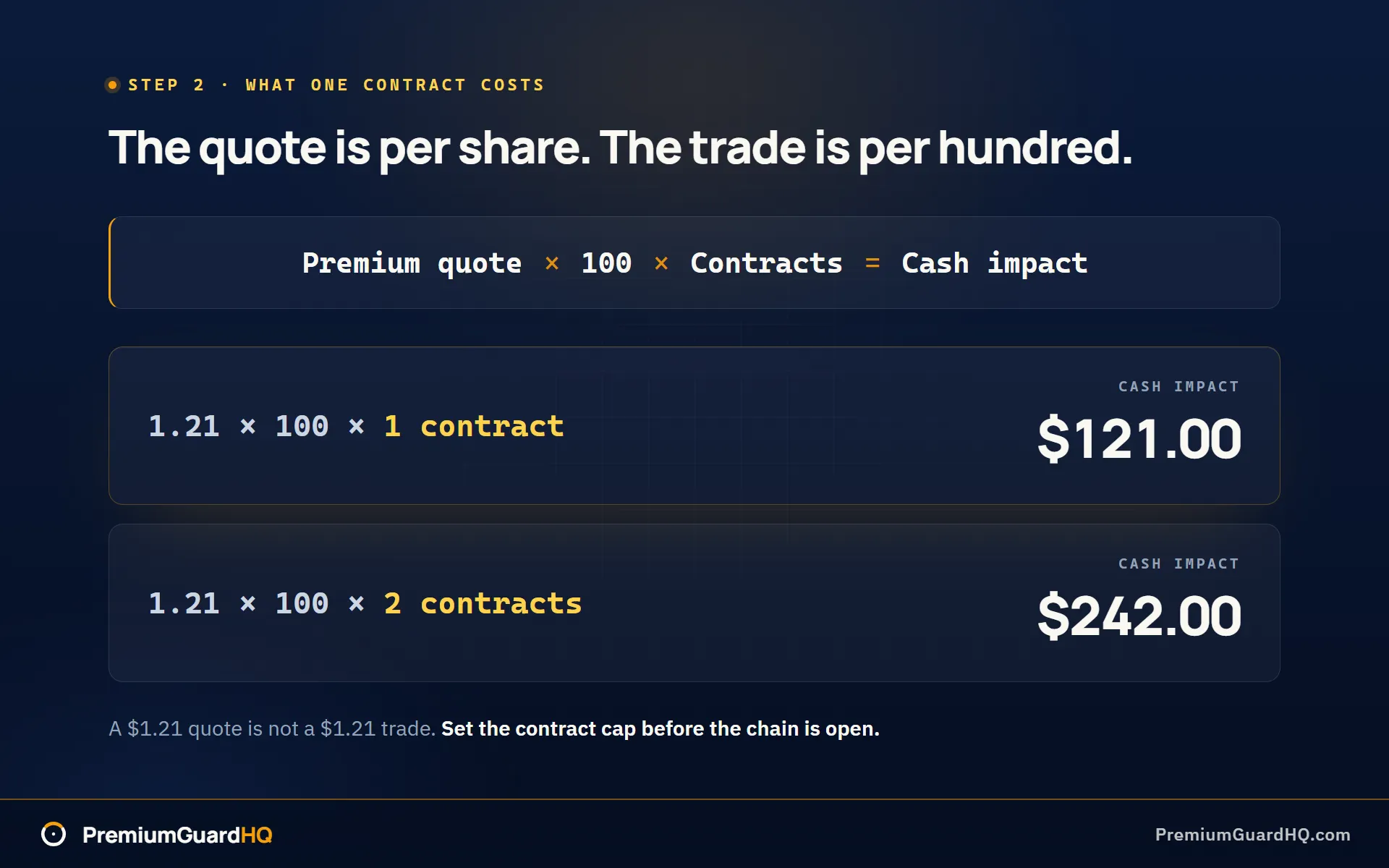
Here is the math. Take the premium quote, the per-share price shown in the chain, and multiply by 100, then by the number of contracts.
Cash impact = Premium quote × 100 × Number of contractsA $1.21 quote does not mean a $1.21 trade. One contract at that price moves $121.
Now compare that number with the right kind of buying power, the money or assets your broker lets you use for a trade. Each order type draws from a different pool.
- Buying a call or put: this is buy to open. Your cost is premium times 100 times contracts, plus fees. The cash leaves your account right away.
- Selling a covered call: this is sell to open. You need 100 shares of the stock per contract already in your account. Without the shares, the order will not work.
- Selling a cash-secured put: also sell to open. The broker sets aside cash in case you need to buy the stock later. The amount held back follows the broker’s own rule. Check the order ticket before assuming you know the number.
Once the math is done, set a hard cap for this first order. Decide the maximum contracts you will allow yourself to submit, and write that number down before you build the ticket. If you want to see the arithmetic laid out for you, price one contract at a given premium before you open the chain.
Check the order preview screen against that number later. The preview should show the same maximum loss or collateral you calculated by hand. Collateral is the cash or shares held back to cover the trade. If the platform shows a larger number, stop and find out why before submitting.
Finally, confirm the funds are usable now, not just visible. Open the balance screen and look for cash marked available to trade, not pending transfer. A deposit can appear before it has settled. Settling means the broker has fully processed and cleared the transfer. Some brokers hold new deposits for several business days before releasing them for options trades. Do not assume you can place the order now and let the funding catch up later.
You should now be able to state a clear number, such as “two contracts, max.” The platform should confirm you have enough available cash, or the right shares and collateral, to support that exact size.
Step 3: Pick the underlying and the exact option play you are placing
Put the trade into plain words before you open the option chain. The option chain is the list of all available contracts for a stock. This step takes five minutes and prevents a bad click later.
Start with the ticker symbol, the short code for the stock or ETF you want to trade. Pick one with an active options market, where people buy and sell its options every day. You will check this for real in the next step. For now, avoid a name nobody trades.
Then write down two choices side by side:
- Call or put. A call is a contract tied to buying stock. A put is tied to selling stock.
- Buy to open or sell to open. Buying to open means you pay money for the contract. Selling to open means someone else pays you and you take on an obligation in return.
If you sell to open, stop and confirm the position is covered. A covered call means you already own 100 shares backing it. A cash-secured put means you already have enough cash set aside to cover it. This should already be locked in from your preparation.
Set your time window before you look at strike prices. A strike price is the set price written into the contract. Decide whether you are deliberately using a very short-dated contract. Weekly options and 0DTE contracts both deserve their own label: fast contracts. DTE stands for “days to expiration,” so 0DTE means the contract expires the same day you open it. Fast contracts behave differently from a normal trade. Time value is the part of an option’s price tied to how much time remains before expiration. In fast contracts, that value can shrink to nothing within hours instead of weeks. Beginners often click into a weekly or 0DTE contract by accident because brokers sometimes list it first or default to it. Check the expiration date twice unless you are deliberately trading a fast contract.
Finally, define what done means for this trade. Write one sentence that answers whether you will close the position yourself before expiration or let expiration mechanics play out. Expiration mechanics means exercise, assignment, or the contract expiring worthless. Exercise happens when the option buyer uses the right to buy or sell the stock. Assignment happens when the option seller must fulfill that trade.
Your sentence might be “I will close this put before expiration if it moves against me” or “I’m willing to take assignment on this put if the stock lands below my strike.” Either answer works. You need an answer because Step 5 builds your order around it.
By now you should have a full written trade definition: ticker, call or put, buy to open or sell to open, and how you plan to handle expiration.
Step 4: Read the options chain and choose expiration and strike
Open the option chain for the ticker from Step 3. The chain is a table with expiration dates across the top and strike prices down the side. A strike price is the set price at which you can buy or sell the stock. This table is where the real contract choices happen. If the grid still looks like noise, walk through a chain row by row first.
Pick your expiration
Find the expiration date that matches the time window from Step 3 and click it. Then check the listing type shown next to that date. Most tickers offer monthly contracts and separate weekly contracts, and the two behave differently. If you meant to choose a monthly contract but a weekly one is selected, you have the wrong contract before you look at any strike.
Pick your strike
Scan the strike ladder, the list of strike prices running down the chain. Strikes closest to the current stock price are called at the money. Move up and down the ladder and watch how the price changes at each strike. That price is the premium, and it has two parts.
Intrinsic value is what the option would be worth now if you used it today. Extrinsic value is everything else in the price, mostly time and uncertainty. Extrinsic value shrinks a little every day as expiration approaches. That daily shrinkage is called Theta. Extrinsic value also moves with implied volatility, or how much the market expects the stock to swing. That sensitivity is called Vega. You do not need to calculate either one. Just notice that strikes farther from the stock price carry less extrinsic value, and strikes closer to the stock price carry more.
Check liquidity before you commit
After you pick a strike, check its liquidity. Liquidity means how easily you can enter and exit without losing money to a bad price. Look at three things on that exact contract:
- Bid and ask are both visible, and the gap between them is tight. The bid is the highest price a buyer will pay. The ask is the lowest price a seller will take.
- Open interest or volume is meaningful, not zero or one. Open interest is the number of contracts still open across all traders. Volume is how many contracts traded today.
- If either number looks thin, choose a different strike or expiration. A contract with no quotes and no volume is hard to exit later, no matter how good the strike looked on paper.
Confirm the contract size
Check the contract multiplier shown on your platform. It is usually 100, meaning one contract covers 100 shares, which is the unit written into the standardized product terms. That confirms the math from Step 2 still holds.
You should now have one exact contract picked: a specific expiration date and strike price, with a live bid and ask on screen and real open interest or volume behind it.
Step 5: Place the order ticket and set your exit mechanics
Open the order ticket for the contract from Step 4. The order ticket is the form you fill out to buy or sell an option. Your plan becomes a real trade here, so every field must match what you wrote down earlier.
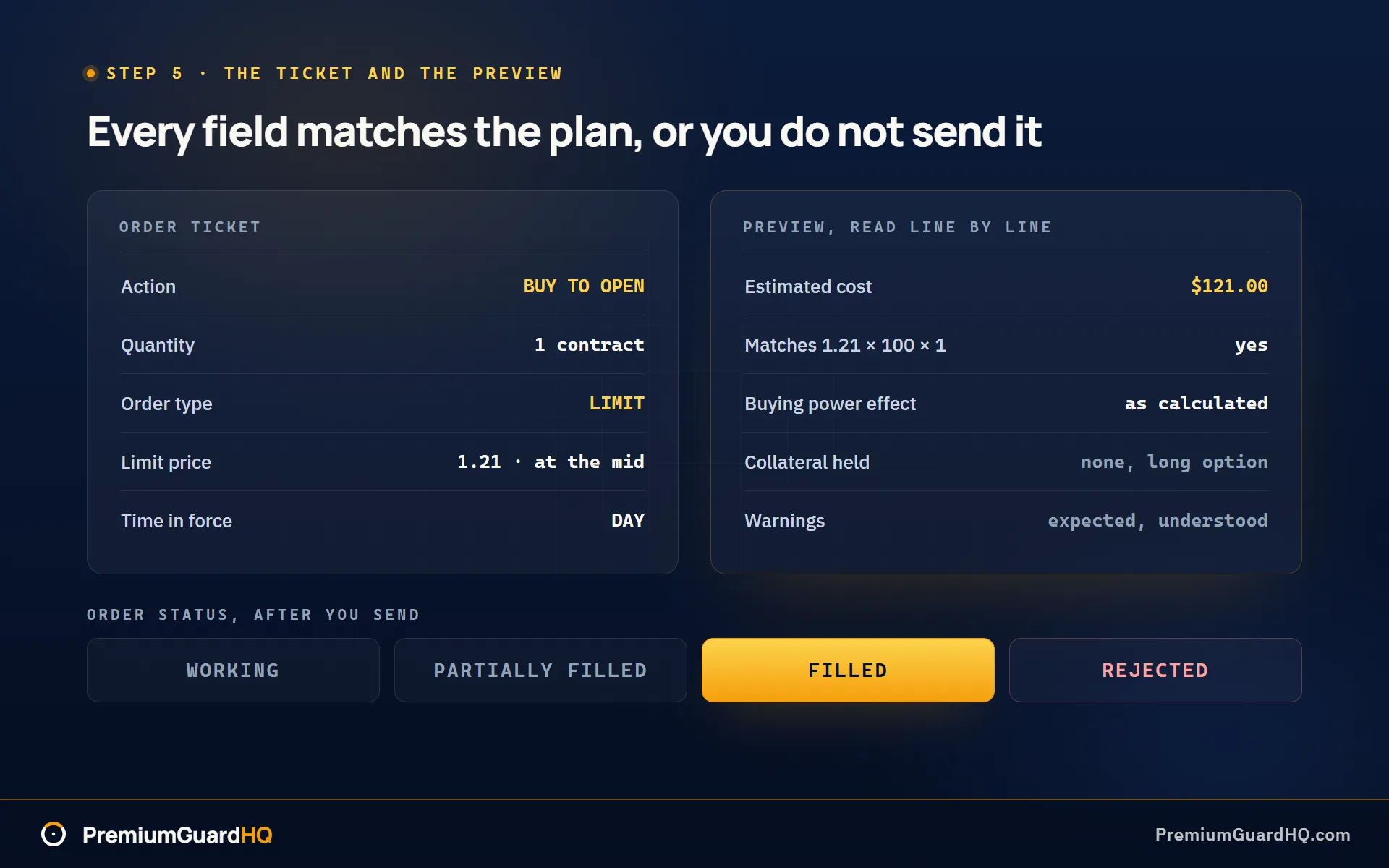
Check the action first. It must match your plan exactly: buy to open or sell to open. Then set the quantity, the number of contracts. Cap it at the number from Step 2. Do not round up because the premium looks cheap. Premium is the price you pay or collect for the option.
For price, choose limit over market whenever possible. A limit order sets the worst price you will accept. A market order takes whatever price is available right now, which can be a bad surprise on a thin contract, one with few buyers and sellers. Start your limit at the mid-price, the point halfway between the bid, what buyers offer, and the ask, what sellers want. Move it only on purpose.
Finally, set time-in-force. This tells the broker how long to keep trying to fill your order. Day cancels the order at market close if it does not fill. Good-til-canceled, or GTC, keeps it working for several days. Choose day orders while you are new. You will know quickly whether your price was reasonable.
Before you hit submit, read the preview screen line by line:
- Estimated cost or credit should match premium × 100 × contracts from Step 2.
- Buying power effect or collateral, the money or stock your broker sets aside to cover the trade, should match what you calculated, not a bigger surprise number.
- Warnings about assignment risk or margin should make sense given your plan. If something looks unfamiliar, stop and find out why before sending.
Send the order once the preview checks out. Watch the status field. It will show working while it looks for a match, partially filled if only some contracts filled, filled once the order is complete, or rejected if something blocked it. Stay with it until you see filled. Write down the exact fill price and quantity you received, not just what you requested.
Finally, lock in how the position ends. If your plan is to close early, find the close position button on your positions page. It builds the opposite order for you: sell to close for something you bought, buy to close for something you sold. If your plan is to hold to expiration, the date the option ends, make sure you can meet the obligation if you get assigned. Assignment means you must buy or sell the stock at your strike price, the price set in the contract. Confirm you have the shares or cash ready before that date. Closed or exercised options commonly settle the next business day, often called T+1.
Your order status should now read filled, not just submitted. The positions page should show the correct open position, or a closed trade record with the exact quantity and price from your fill.
What success looks like after your first options trade
The order is placed. Check the following to confirm it worked.
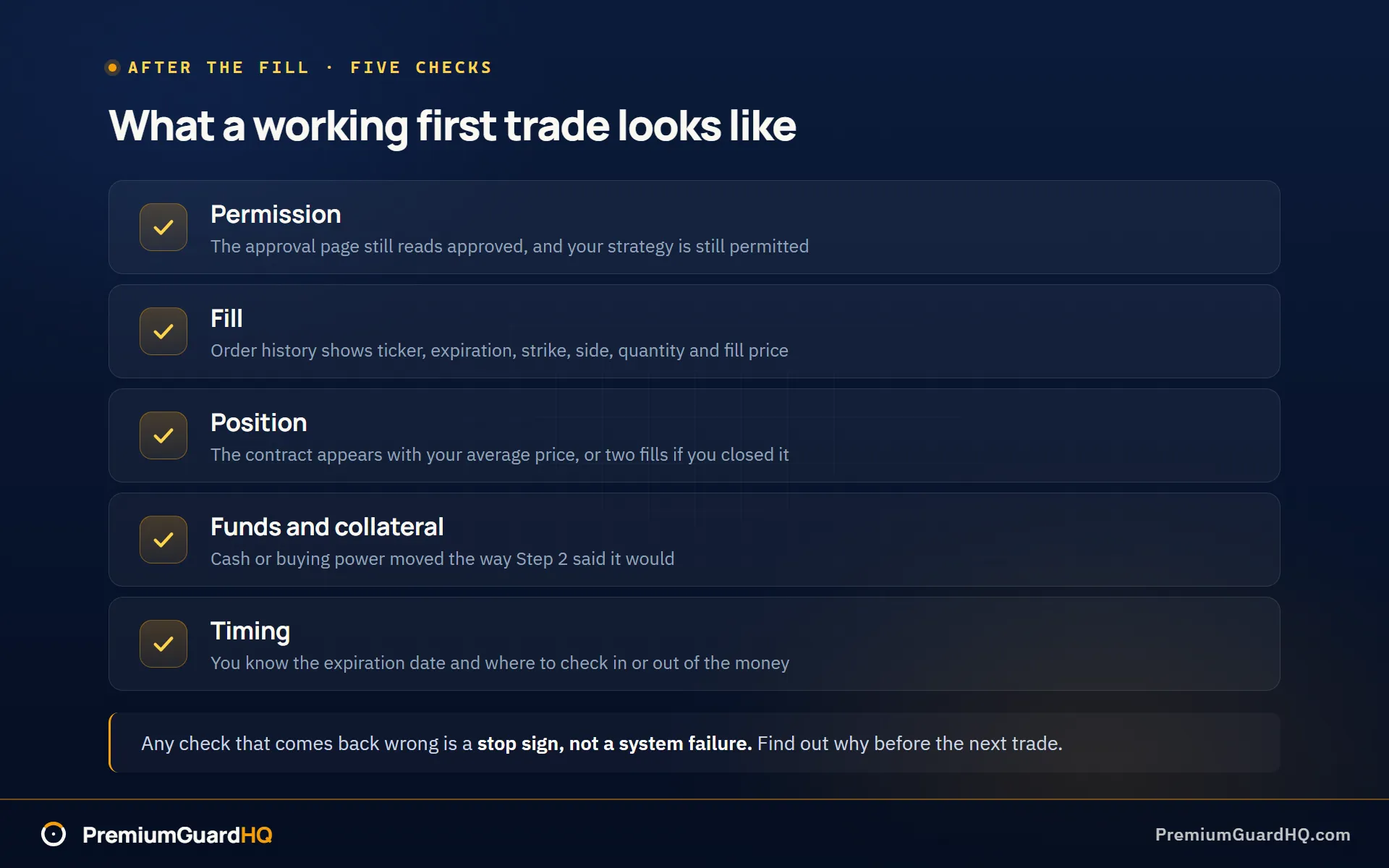
Permission check. Return to the options approval page from Step 1. It should still say approved. Your strategy, such as covered calls or cash-secured puts, should still be listed as permitted.
Fill check. Open your order history or execution report, the broker’s record of what happened to your order. You should be able to read the ticker, expiration date, strike price, call or put, buy or sell, number of contracts, and fill price.
Position check. If you opened a trade, the positions page should list the contract with your average price. If you closed it right away, your history should show two fills: one opening and one closing.
Funds and collateral check. After buying an option, your cash should be lower by the premium you paid. After selling one, your buying power or collateral should have moved the way you expected in Step 2.
Timing awareness. Note the expiration date. Know where to check whether your contract is in the money or out of the money as that date gets closer. In the money means exercising it would make you money right now. Out of the money means it would not.
If any check comes back wrong, stop and find out why before placing another trade. A missing fill or an unexpected cash change usually means something was misread rather than a system failure.
Frequently asked questions
Why did my broker deny my options application, or only approve me for a lower level than I wanted?
Brokers score applications using your trading experience, income, and stated risk tolerance. Each broker sets its own cutoffs for each level, so the same answers can be approved at one firm and denied at another. First, check exactly which level your planned trade needs. Covered calls or cash-secured puts usually require a low level, not the top tier. If your application details were inaccurate or outdated, update them. If you are still stuck, call the broker’s support line and ask what is missing. They can often tell you exactly what would change the decision.
What does “1 options contract” actually mean in dollars?
One equity options contract almost always covers 100 shares of stock. To find the real cash impact, multiply the premium quote by 100. A premium of $1.21 means one contract moves $121 before fees, not $1.21. This is the same multiplier covered in Step 2. Always double-check the multiplier shown on your own platform before you submit an order. It is standard at 100, but confirming is better than assuming.
Should I use a market order or a limit order for options?
Use a limit order for almost every options trade. A market order fills immediately at whatever price is available. A limit order sets the worst price you will accept, and the trade only fills at that price or better. Options often have wide gaps between the bid, the highest price a buyer offers, and the ask, the lowest price a seller wants. A market order on a wide spread can fill you at a bad price. Check the bid and ask on your chain, find the mid-price halfway between them, and start your limit there.
What happens if I hold an option through expiration?
The outcome depends on whether the contract is in the money, meaning it has value if used right now. In-the-money contracts are often exercised automatically at expiration. Exercise means the buyer uses the right to buy or sell the stock. Assignment means the seller on the other side must fulfill that trade. Cutoff times and automatic-exercise rules vary by broker, so check yours directly. Before expiration day, confirm you can meet the obligation with enough cash to buy shares or enough shares to deliver. Settlement after exercise or assignment commonly lands the next business day, often called T+1.